Description
Live demo (no install needed): Explore the full BrikPanel admin on a real WooCommerce store
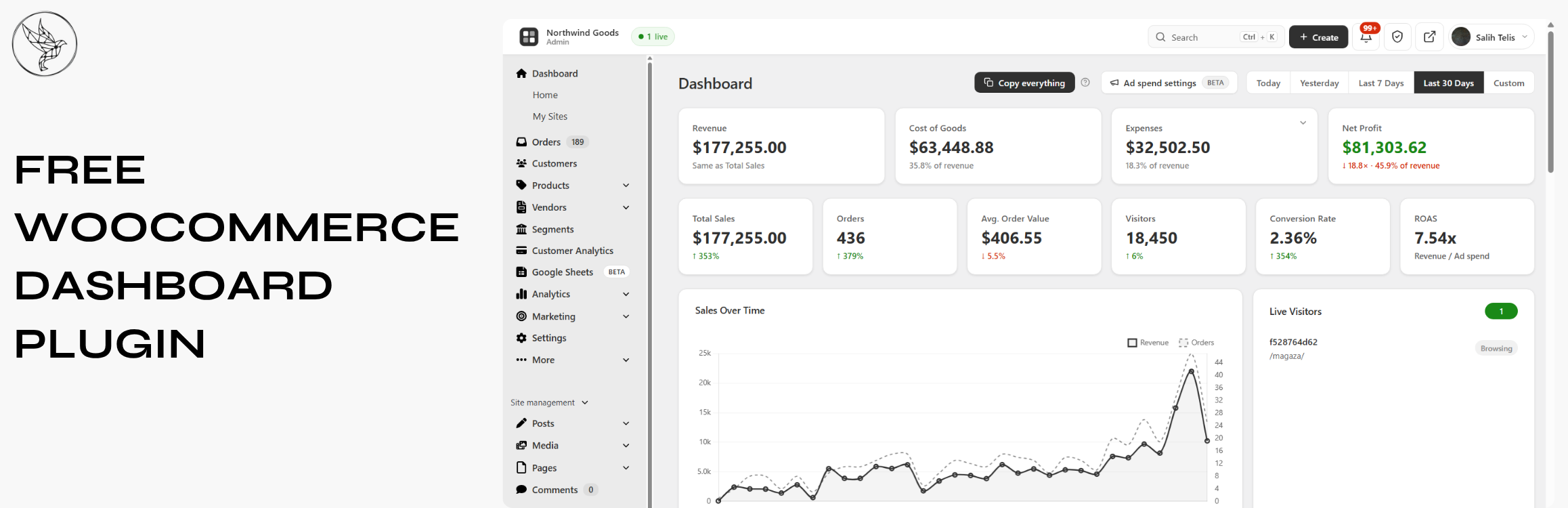
BrikPanel turns the default WooCommerce admin panel into a clean, fast, all-in-one cockpit — a modern WooCommerce dashboard, a powerful WooCommerce bulk editor, an inventory management workspace, an order management center, a coupon manager, a custom WP login page, and a real-time conversion tracking suite. Everything is free. Forever. No premium tier, no feature locks, no monthly subscriptions. A self-hosted Shopify alternative for WooCommerce — own your data, your products, and your customer list, with no monthly platform fee and no transaction fee.
Built by a developer who shipped 1000+ WooCommerce stores and got tired of every workflow taking five extra clicks.
Who is BrikPanel for?
- Store owners who want a modern WooCommerce dashboard with real numbers, not the slow built-in reports — and a self-hosted WooCommerce analytics solution instead of paying monthly fees to external SaaS tools
- Stores that want a lighter woocommerce inventory management workspace built into a complete admin redesign
- Anyone who needs to bulk edit WooCommerce products — including variations — without a premium plugin
- Agencies handing off stores to non-technical clients who need a simplified WooCommerce admin
- Shop owners migrating from Shopify who want a familiar, modern admin for their WooCommerce store — a free, self-hosted Shopify alternative
What you get (all free)
Modern WooCommerce Dashboard with Real-Time Sales Analytics
The heart of BrikPanel is a modern WooCommerce dashboard — a true woocommerce admin panel plugin, not a styling layer.
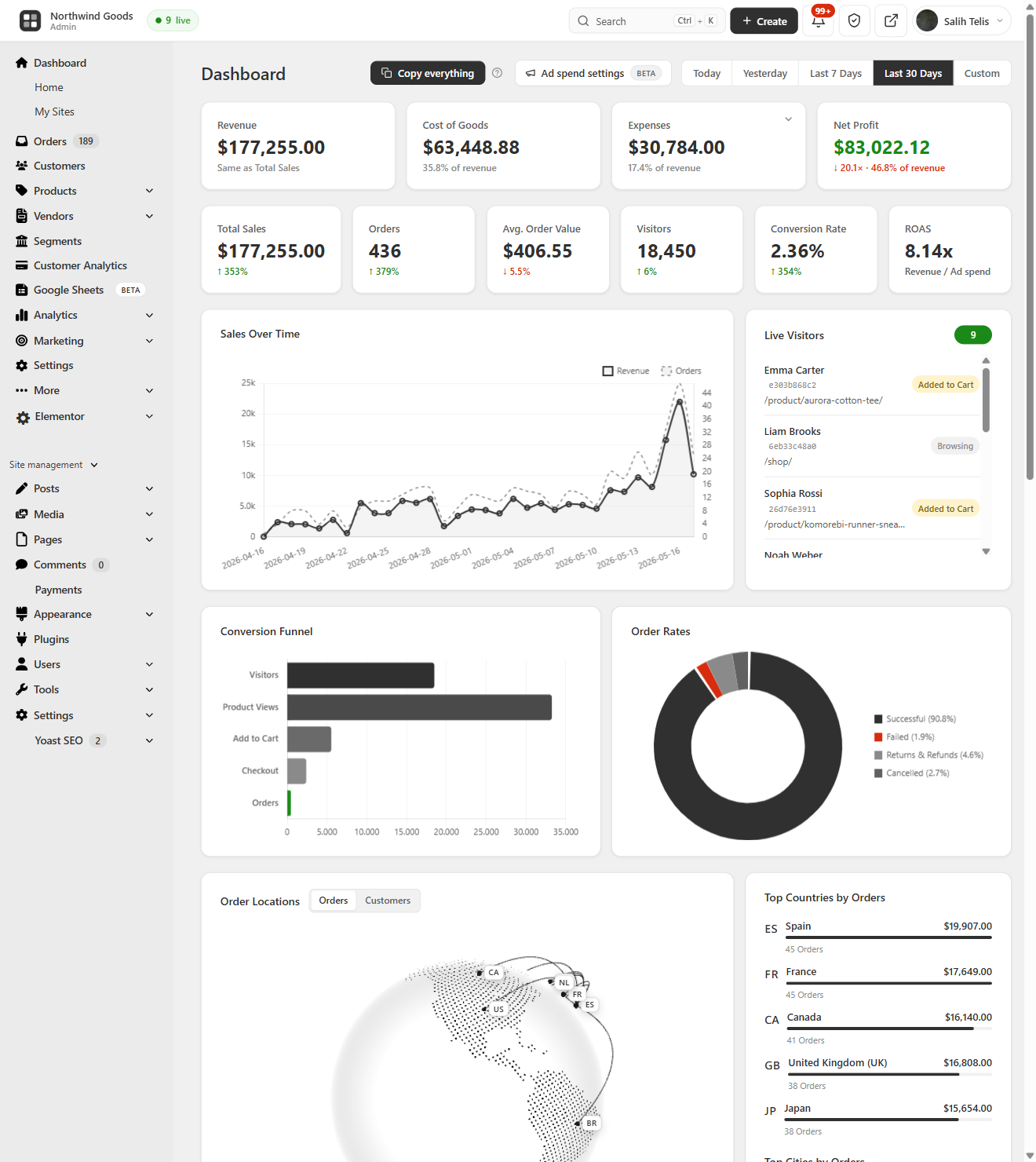
- Total Sales, Total Orders, Average Order Value (AOV) — today, yesterday, last 7/30 days, or any custom range, with ±% period-over-period delta on every metric
- Visitors counted from your own database (admins excluded), and Conversion Rate computed live from real visitors and real orders
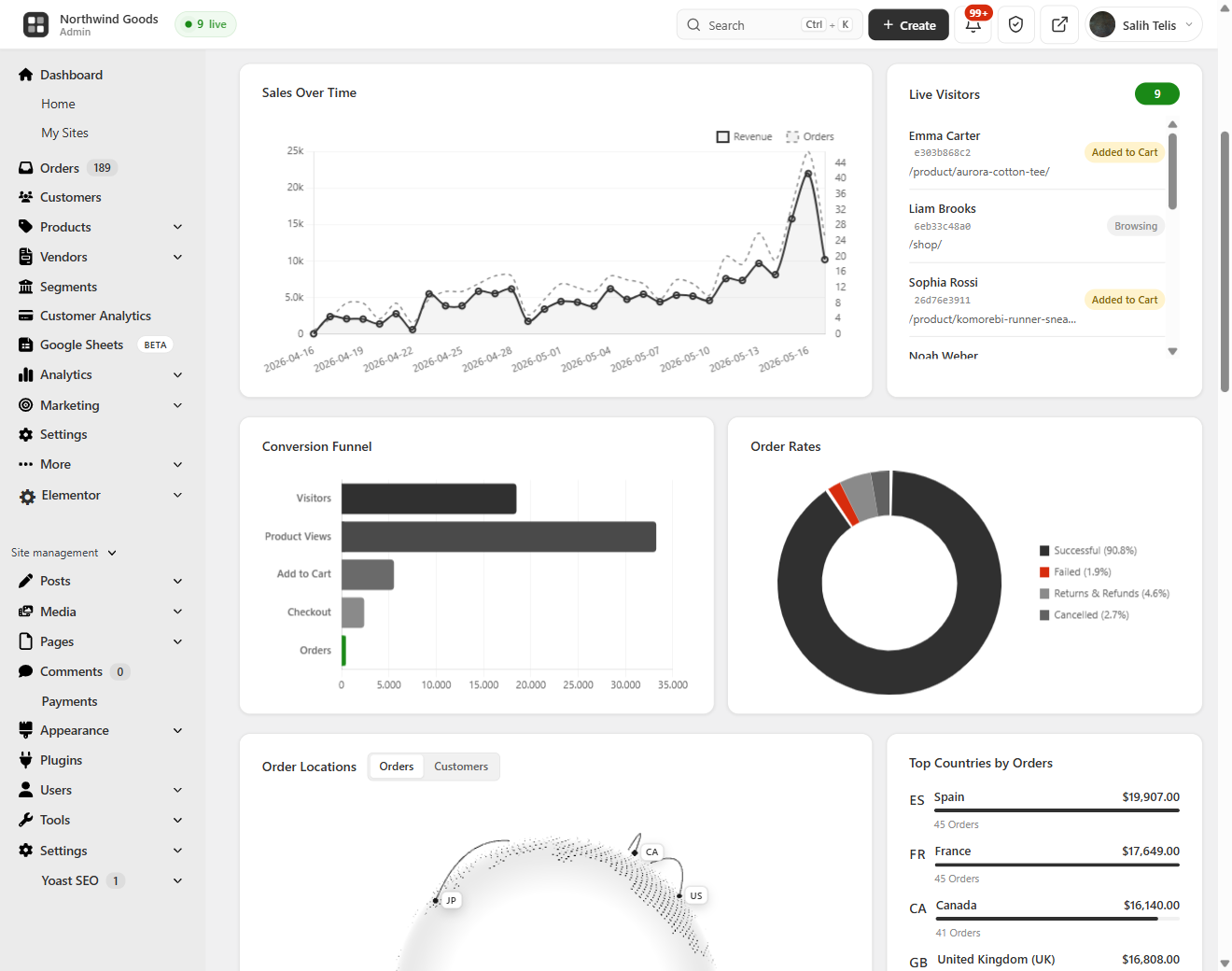
- Beautiful sales chart powered by Chart.js, plus an order status donut (Completed, Processing, Cancelled, Refunded, Failed)
- WooCommerce conversion funnel — Visitors Add to Cart Checkout Orders, with the conversion percentage at every step
This is the best WooCommerce dashboard and a complete WooCommerce sales report for stores that need a modern WooCommerce admin and a woocommerce custom dashboard.
Customer Analytics — LTV, RFM Segmentation & Cohort Retention
BrikPanel ships a complete WooCommerce customer analytics suite, calculated from your store data and visualized in the dashboard — no external service.
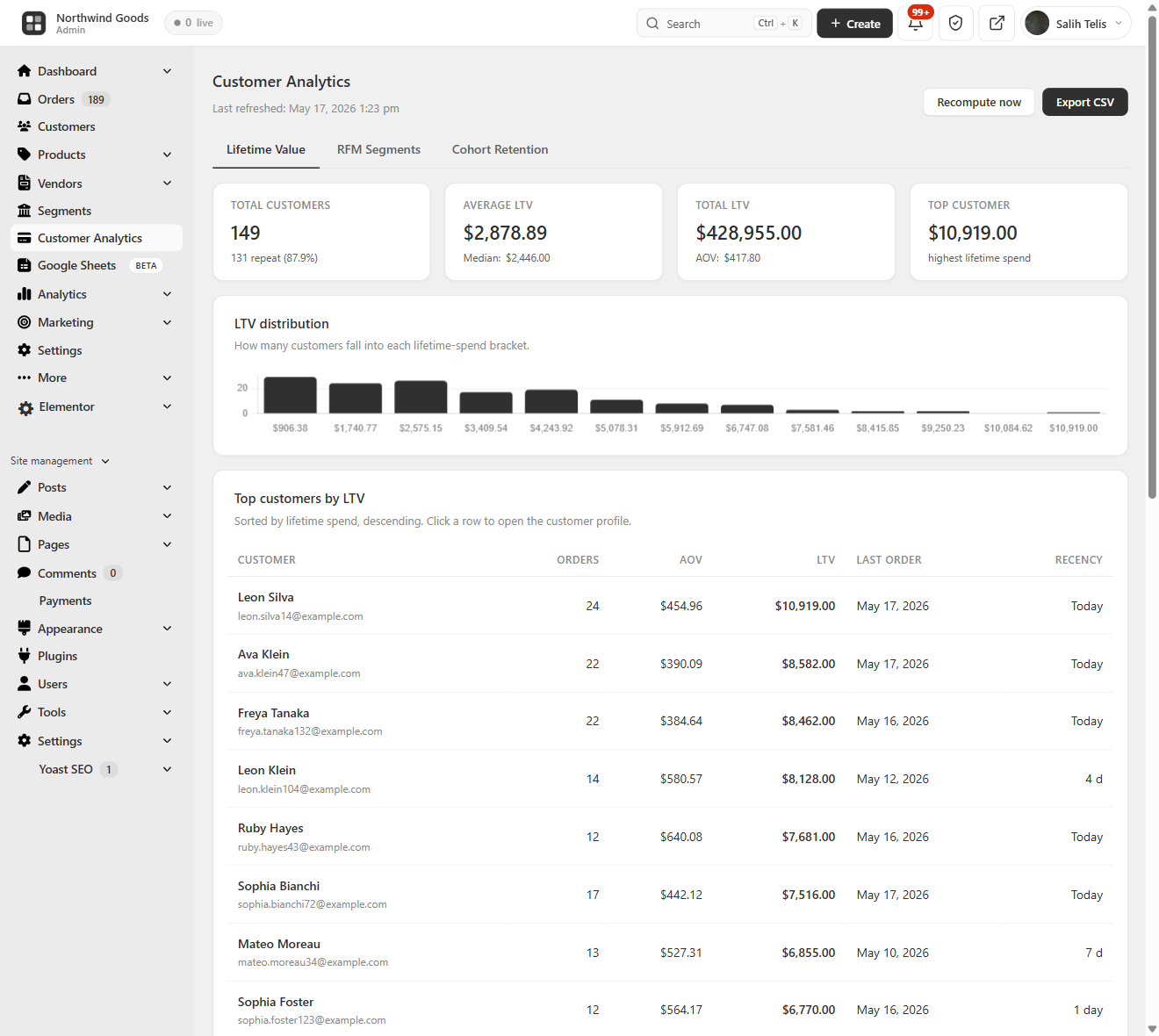
- Customer Lifetime Value (LTV) — total customers, average and top LTV, full LTV distribution histogram, and a sortable top-customers table
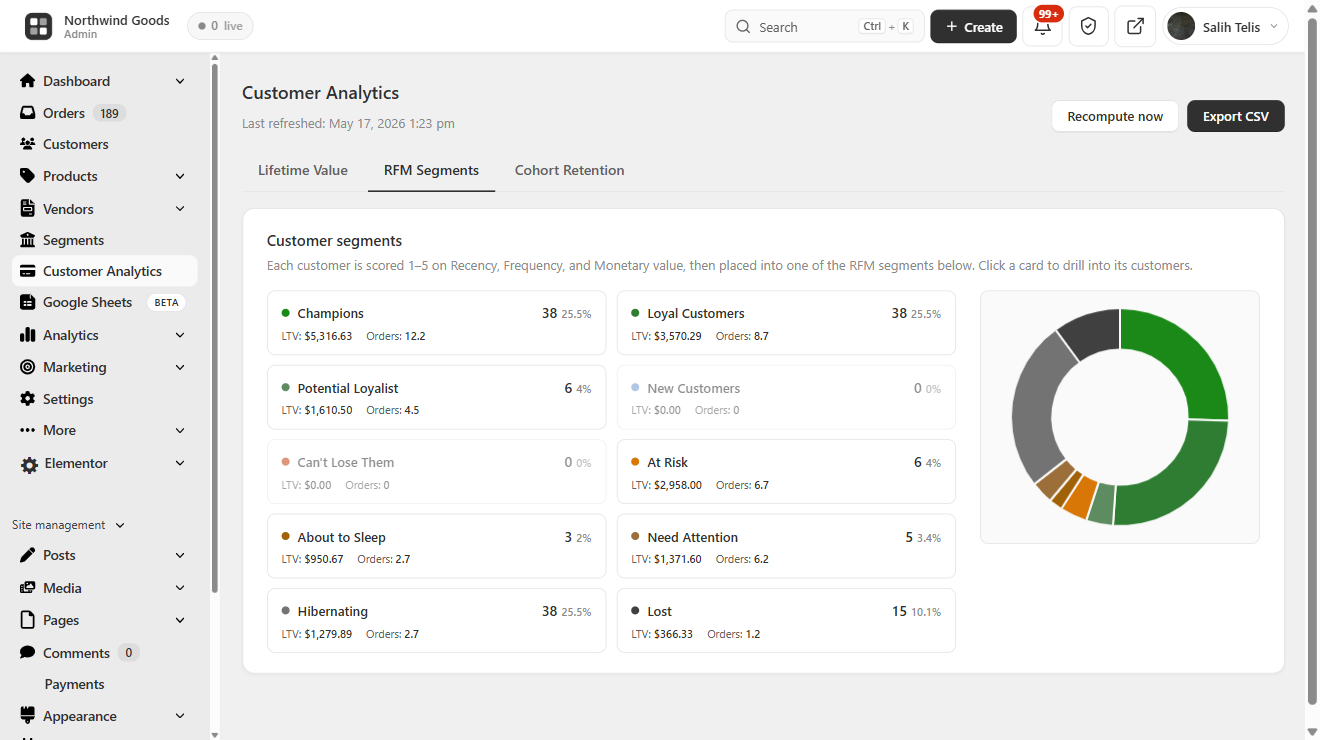
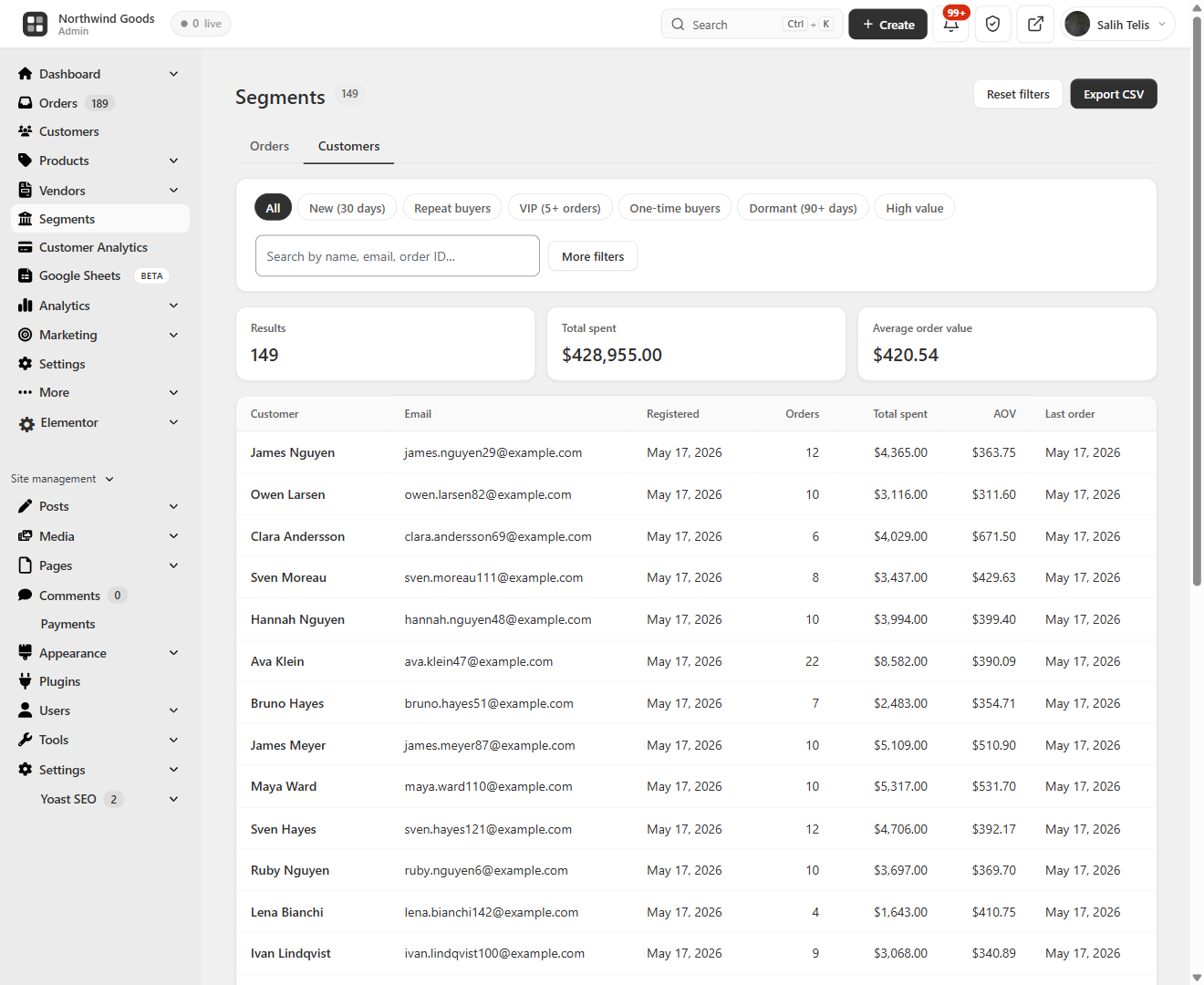
- RFM segmentation — every customer scored on Recency, Frequency, and Monetary, then bucketed into Champions, Loyal, At Risk, About to Sleep, Hibernating, and Lost, with revenue per segment
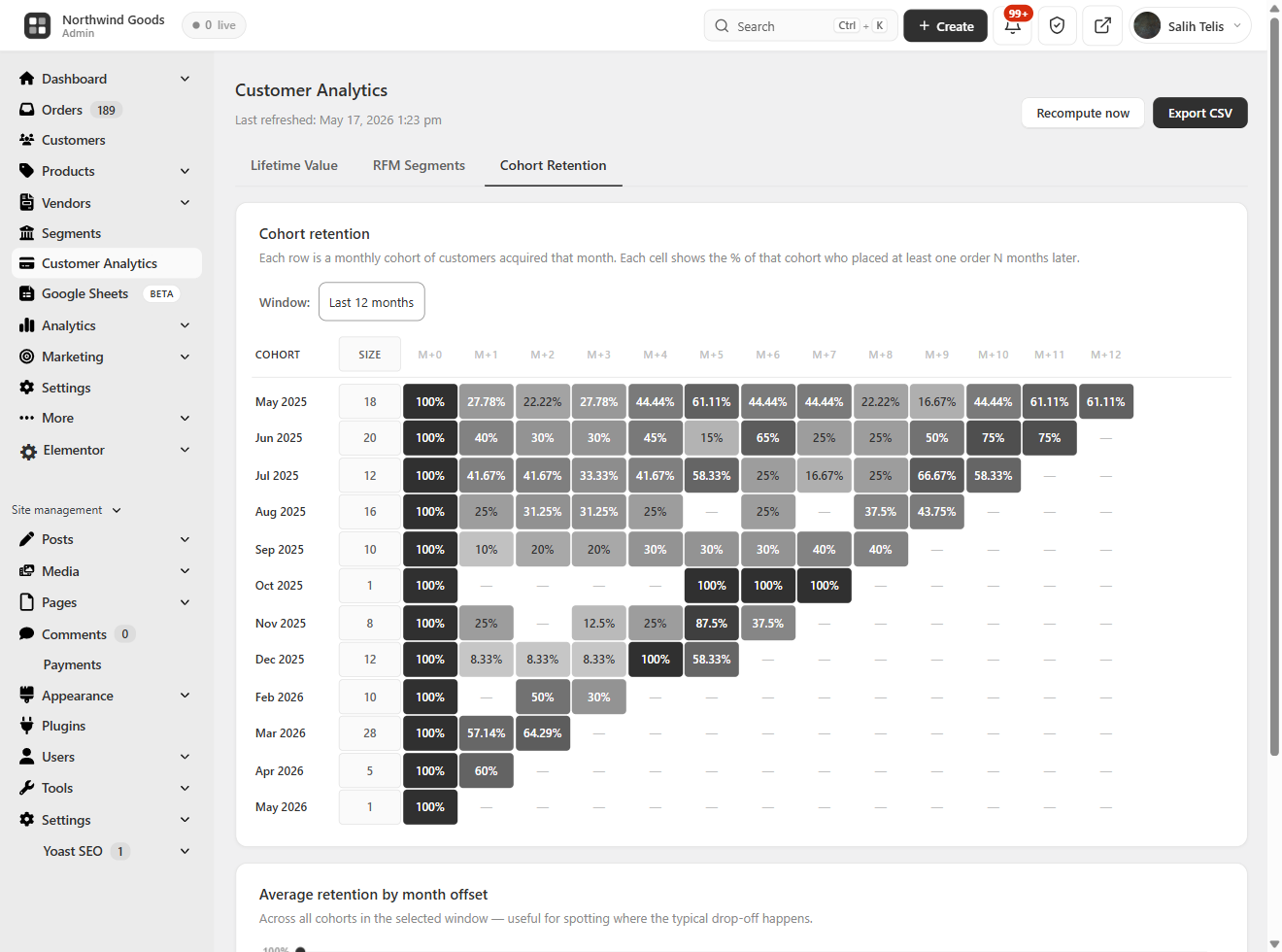
- Cohort retention — month-by-month cohort retention grid plus an average retention by month-offset trend line
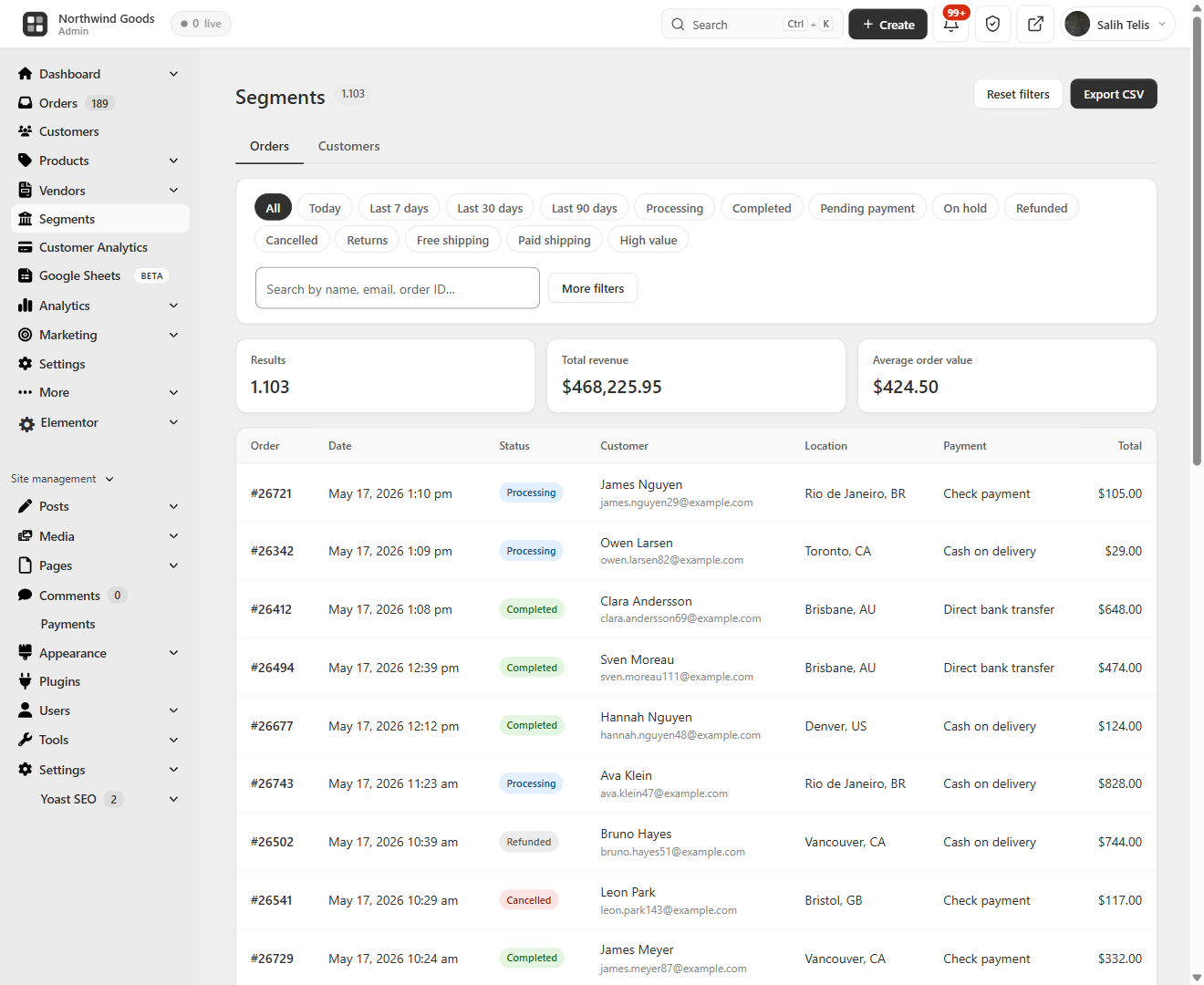
- Advanced filtering and segmentation — combine spend range, product, location, date and more to build saved segments for both customers and orders
A free woocommerce LTV plugin, woocommerce RFM tool, and woocommerce cohort retention report rolled into the same dashboard you already use for sales.
Live Visitors & Real-Time Conversion Tracking
BrikPanel ships a built-in WooCommerce live visitors widget — see who is on your store right now, what page they are on, and whether they have items in the cart. Refreshes every 30 seconds. No external service, no Hotjar, no monthly fee.
- WooCommerce real time visitors widget with cart status (Browsing / Has items in cart / On thank-you page), current page, and customer info
- WooCommerce conversion tracking in the same database that powers the dashboard
- IP addresses SHA-256 hashed for privacy
- Most-viewed pages and most added-to-cart products reports
A free woocommerce statistics plugin and woocommerce sales tracker without any external SaaS.
Geographic Analytics — WooCommerce Sales by Country
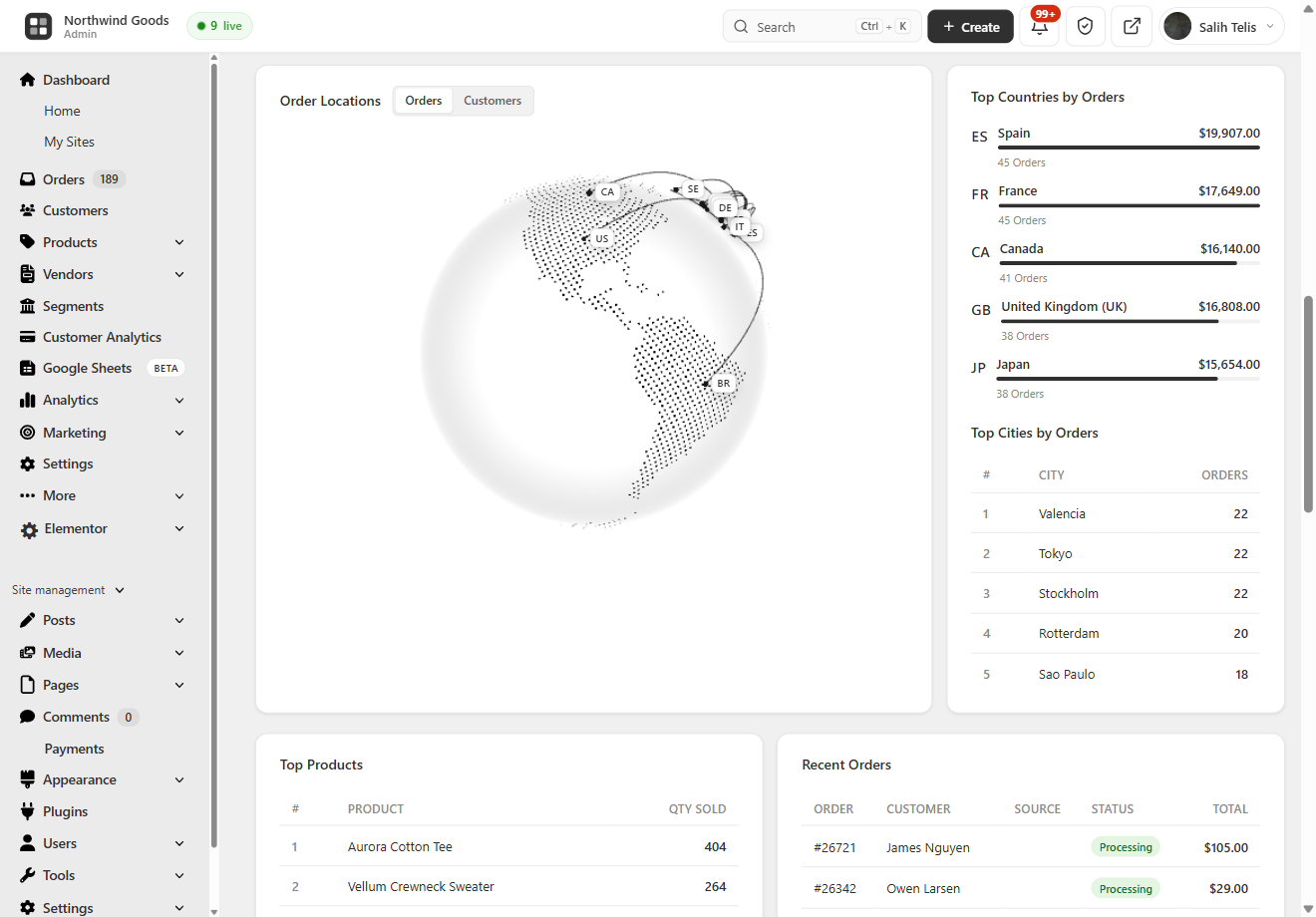
A 3D rotating globe (Cobe.js) plots every order on its real location — see WooCommerce sales by country and city without exporting a CSV, with Top 10 Countries and Top 10 Cities tables. Works with both HPOS and legacy order storage.
Lightning-Fast Order Search — Cmd/Ctrl + K from Anywhere
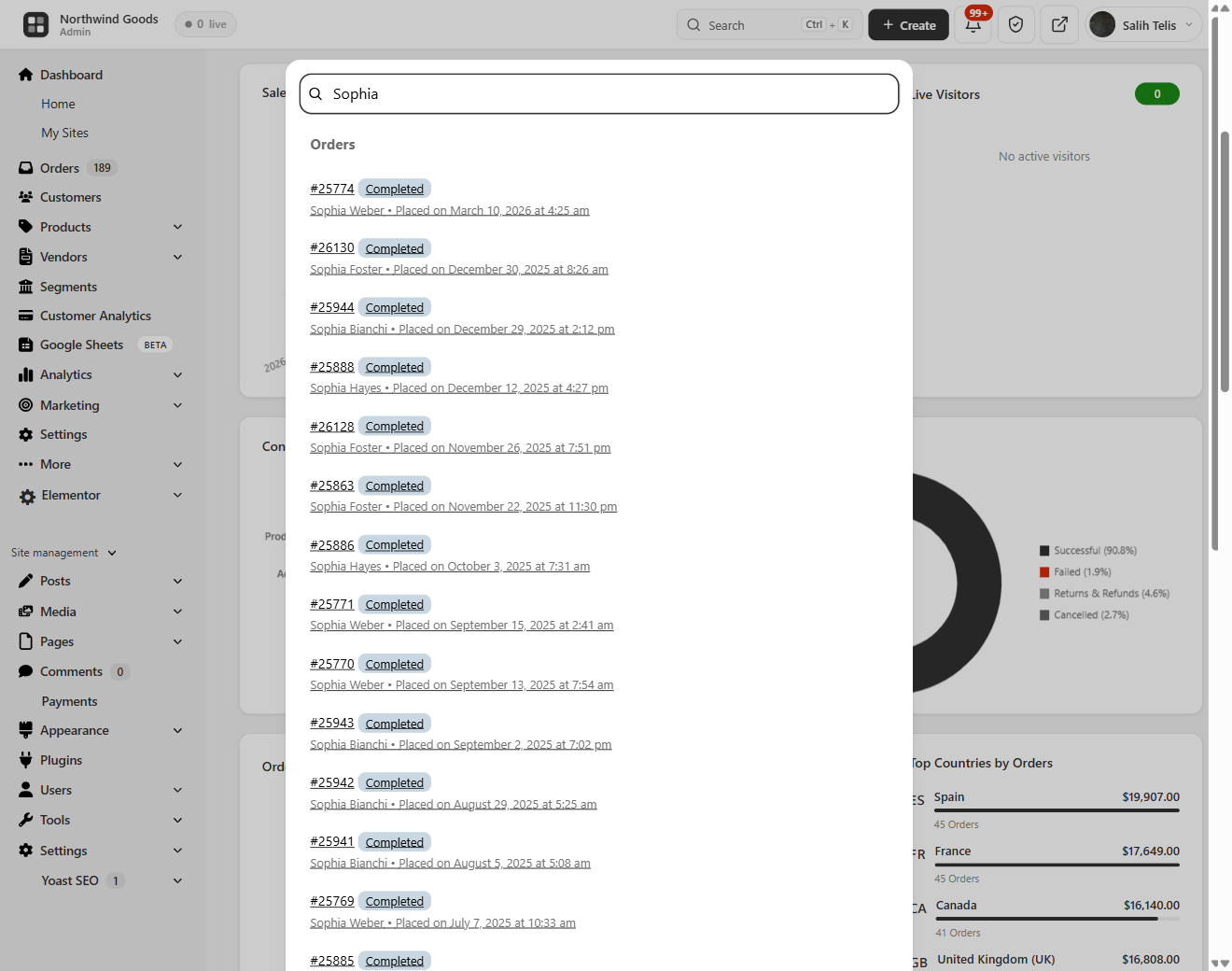
Hit Ctrl + K (or Cmd + K on Mac) anywhere in wp-admin and a beautiful order search overlay opens — the free woocommerce order search plugin every store owner has been asking for. Searches across order ID, customer first/last name, email, phone, and product SKU inside order line items at once. True woocommerce quick search with results as you type, color-coded status badges, totals, and dates.
Modern WooCommerce Order Management
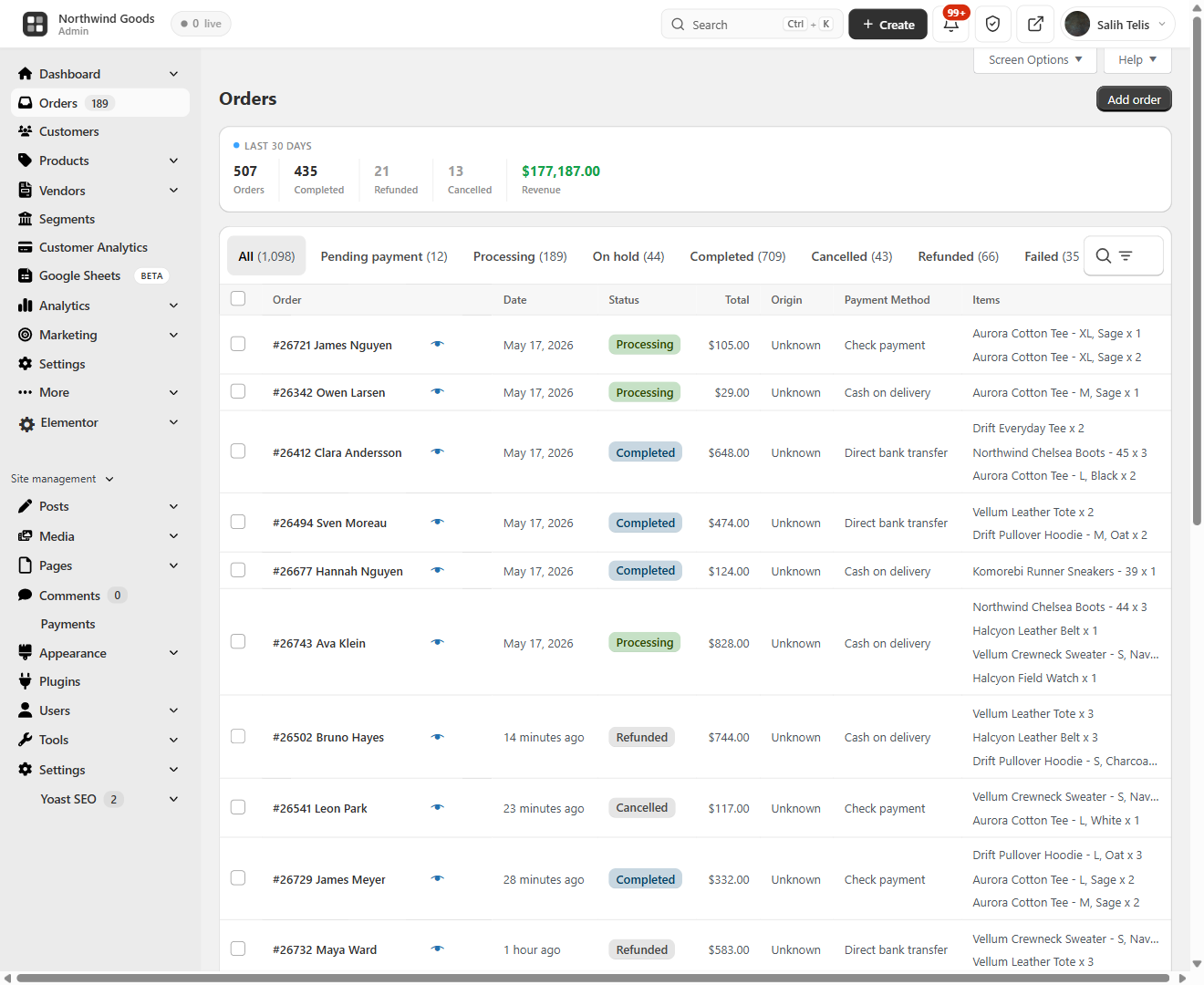
BrikPanel replaces the cluttered default orders page with a clean woocommerce order list plugin screen.
- 30-day overview bar: total orders, completed, refunded, cancelled, revenue
- Inline status change without opening the edit page
- HPOS (
wc_get_orders) and legacy storage (WP_Query) both supported - Two new statuses: Return Draft and Change
- Reskinned order edit page with copy-to-clipboard for billing/shipping
- Sold downloadable products column on the order edit page
- Optional BrikMarket marketplace stats integration
A real woocommerce order management plugin, not a reskin. Disable from settings anytime.
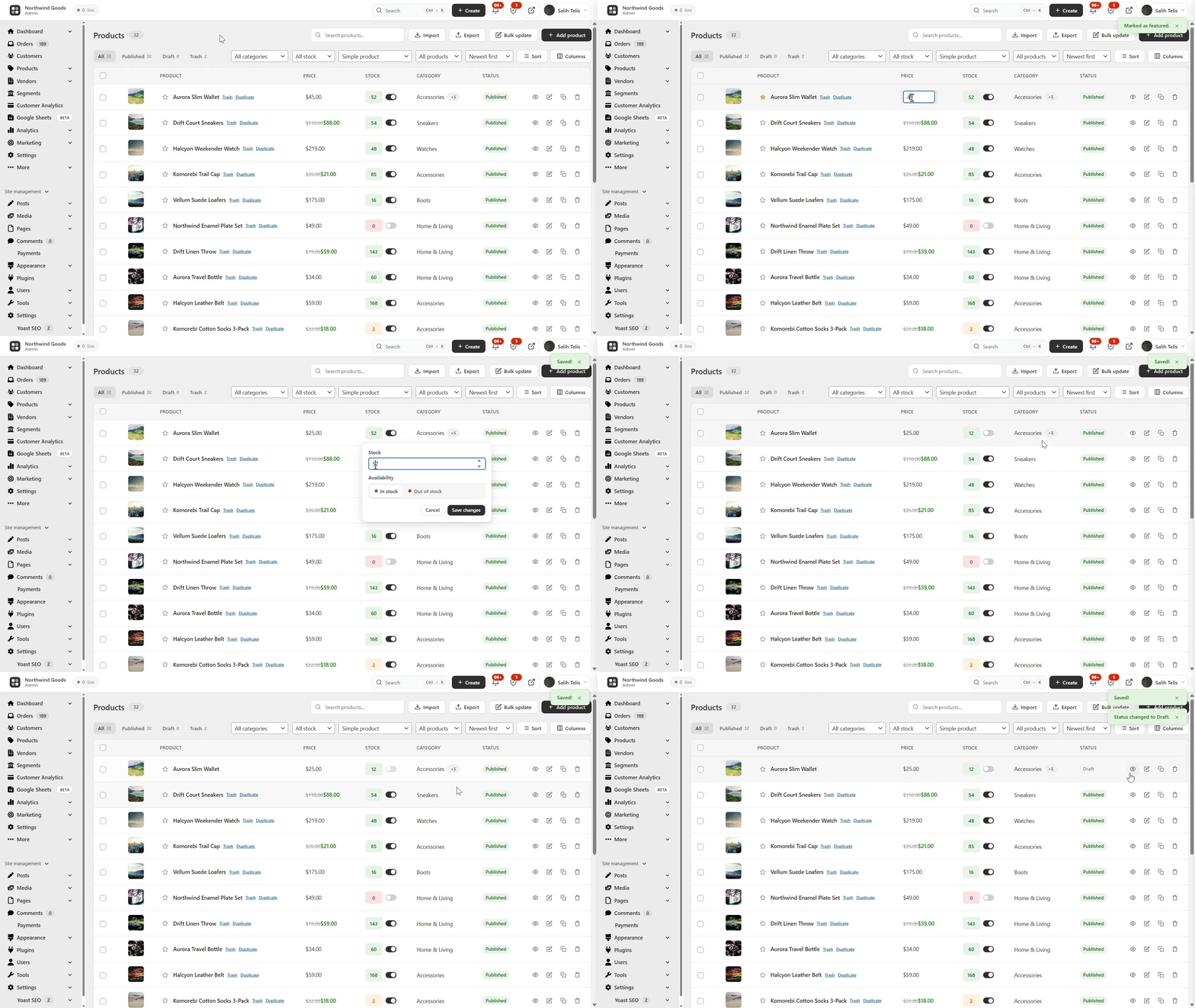
WooCommerce Product List Plugin — Built for People Who Actually Edit Products
The default WooCommerce product list is fine for browsing, painful for editing. BrikPanel ships a complete woocommerce product list plugin that fixes it.
- Thumbnail, name, SKU, regular/sale price, stock badge, category
- Publish status toggle — flip draft published with one click, no reload
- Edit, Duplicate, Delete actions; bulk publish, draft, delete
- Status tabs (All / Published / Draft / Trash), live search by name or SKU
- Configurable per-page (5–100, default 20), AJAX pagination
- Per-user toggles for any third-party / SEO column added by Yoast, Rank Math, ASE and other plugins
- Admin and Site Enhancements (ASE) custom columns are respected in the BrikPanel product, order and customer lists
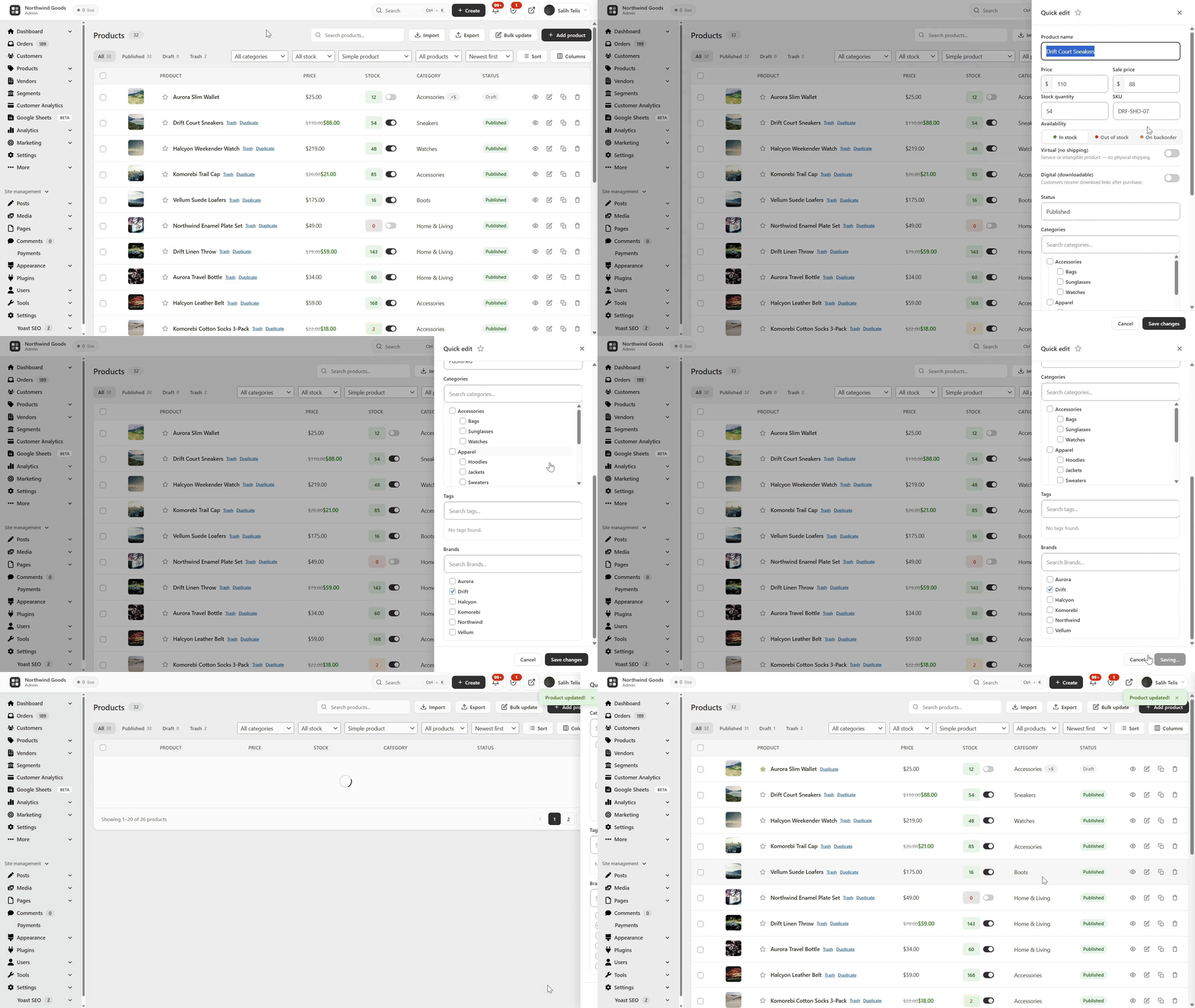
Quick Edit Sidebar — Edit Without Leaving the List
A slide-in panel from any product row to edit name, SKU, regular/sale price, stock, and category — save without leaving the list. The woocommerce quick edit experience WooCommerce should have shipped years ago. Update woocommerce quick edit price, stock, or category in two clicks.
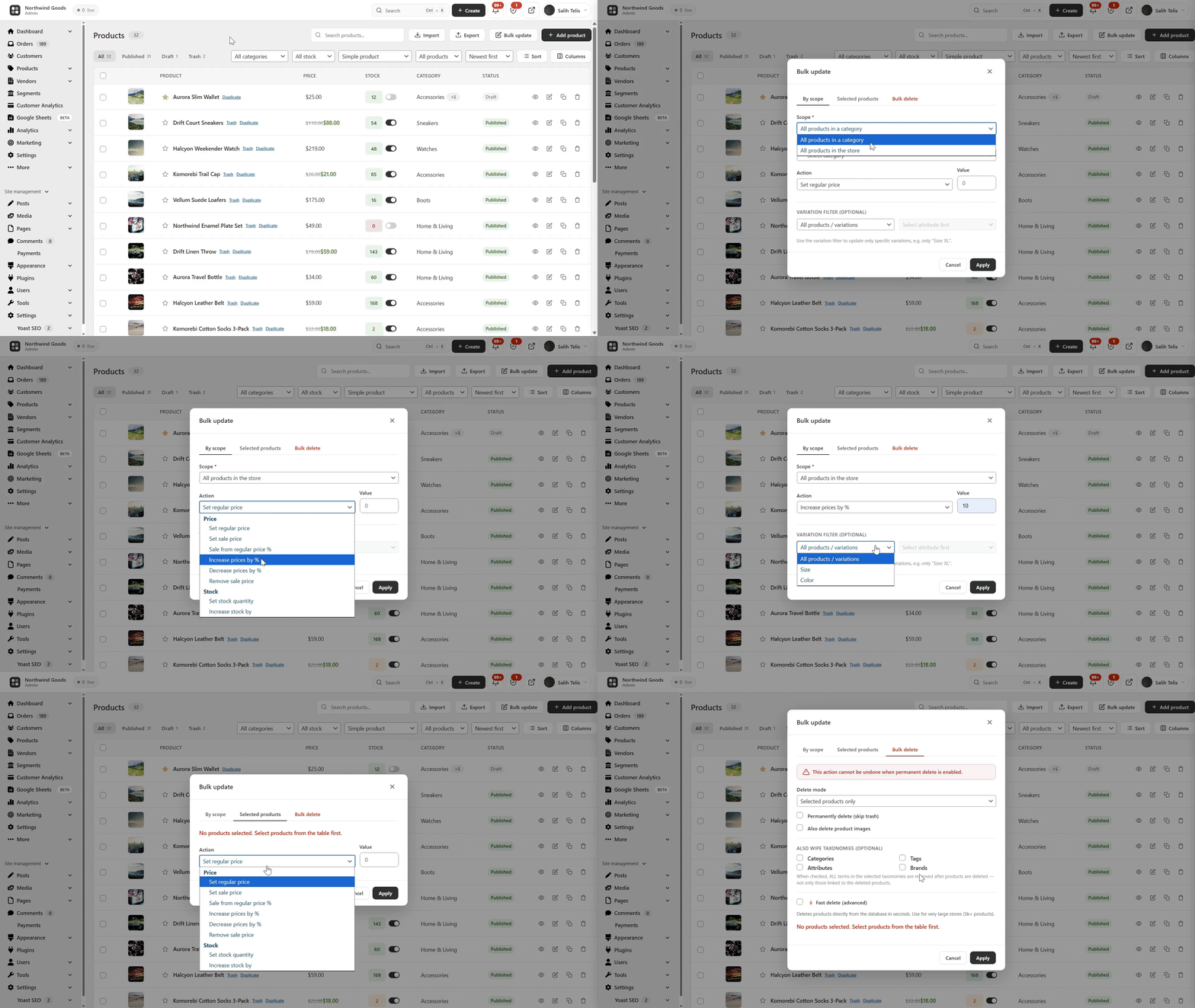
Bulk Edit WooCommerce Products with the Variation Editor — Full Variation Support
This is where BrikPanel pulls ahead of every other free woocommerce bulk editor. Most free plugins only handle simple products and only let you “increase price by X%”. BrikPanel does much more — and does it for variable products too.
- WooCommerce bulk price update (regular and sale) — percentage, fixed amount, or absolute value, across the whole catalog or filtered by category
- Bulk update WooCommerce products stock quantities (in/out of stock, set quantity, add/subtract)
- WooCommerce bulk price by category — pick a category, set a rule, every product updates
- WooCommerce bulk sale price updates with a date range
- Confirmation dialog on every bulk action
Now the part nobody else does for free: variation support.
- WooCommerce variation editor — open any variable product and edit every variation in one modal (regular price, sale price, stock, SKU)
- Bulk edit variation prices WooCommerce — set the same price for all variations of an attribute (every “Red” variation, every “L” size), or apply a percentage rule
- Bulk update variation stock — set or adjust the stock of every variation in one click
- Attribute filter to narrow visible variations when a product has 50+ combinations
How to bulk edit WooCommerce products including variations without buying a $79/year plugin? BrikPanel handles both simple and variable products for free.
Simplified WooCommerce Product Editor
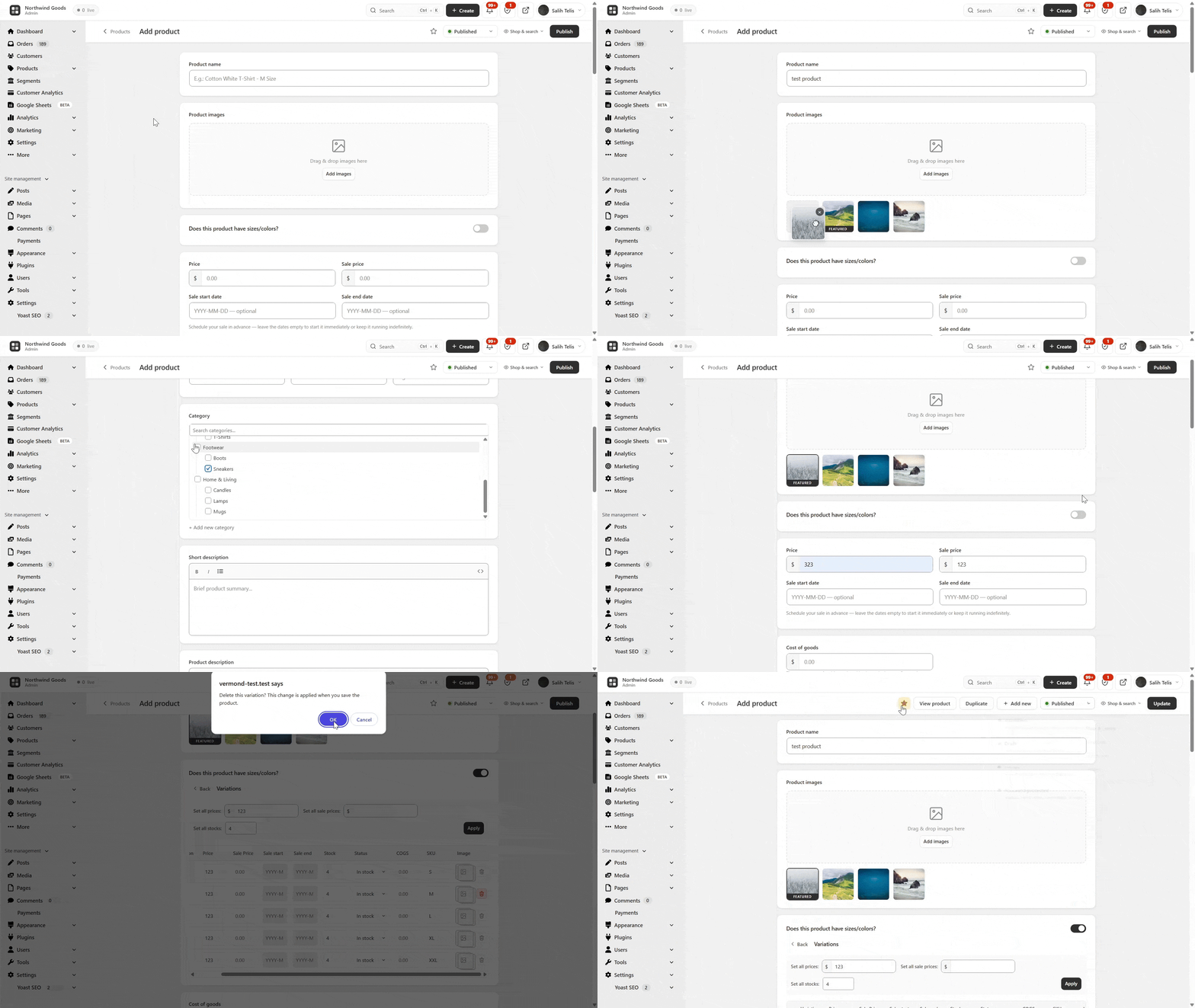
The default WooCommerce add-product screen has 11 metaboxes, 3 tabs, and 40+ fields. New owners give up before finishing their first product. BrikPanel ships a complete woocommerce product editor plugin with the noise removed.
- Featured image + product gallery with drag-and-drop upload, unlimited images, drag-to-reorder
- Regular price, sale price with decimal validation
- Searchable category picker with multi-select + quick create category without leaving the page
- Brand field — the WooCommerce
product_brandtaxonomy is now first-class alongside categories and tags - Short description + full rich-text description (wp_editor)
- SEO fields — custom slug, meta title, meta description, live Google SERP preview
- Full SEO plugin compatibility — Yoast SEO, Rank Math, All in One SEO and SEOPress metaboxes (including the SEO score panel) render and save inside the BrikPanel product editor
- Product type (Simple, Variable), attribute management with inline create
- Auto-generate variations from attribute combinations, per-variation price/sale/SKU/stock
- Duplicate any product in one click
Opt-in. Keep the default WooCommerce product page if you prefer.
WooCommerce Variation Gallery
Attach a separate image gallery to each product variation — the frontend swaps gallery automatically when a customer picks a variation. Image metadata (srcset, sizes, alt text) is fully preserved.
WooCommerce Categories Page — Drag-and-Drop Parent/Child Management
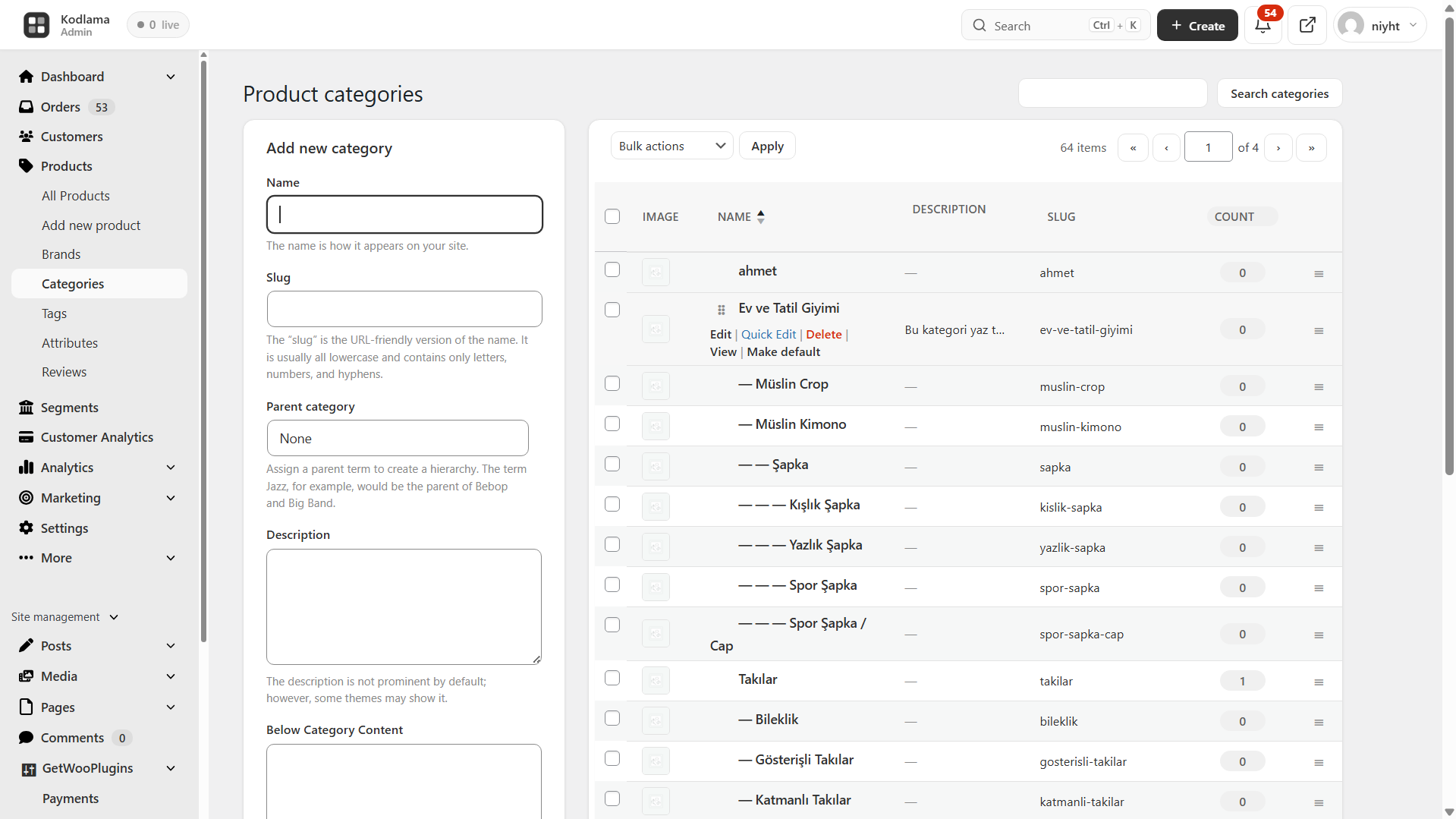
The default WooCommerce category screen has not been redesigned in a decade. BrikPanel rebuilds it with per-page settings (5–200), drag-and-drop parent/child nesting with circular reference prevention, for both product_cat and product_tag.
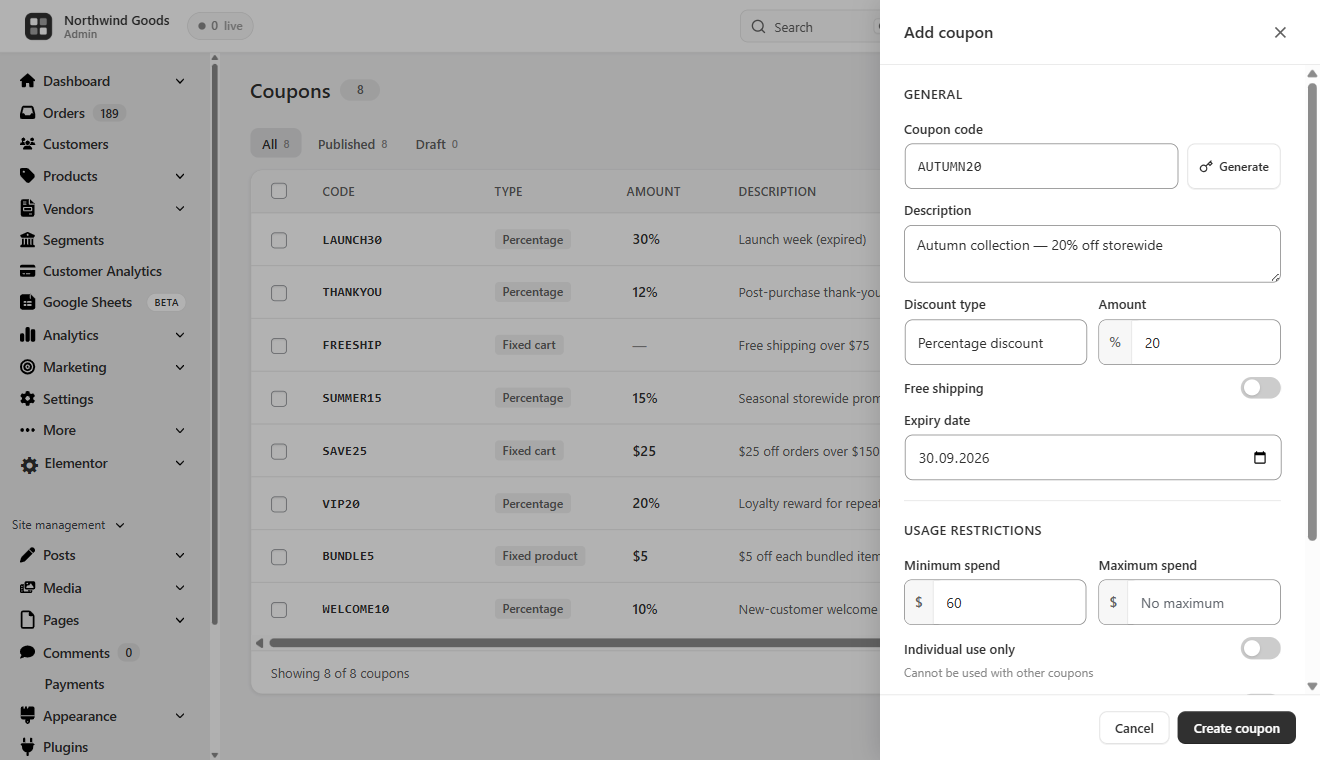
Best WooCommerce Coupon Plugin — Free Coupon Manager
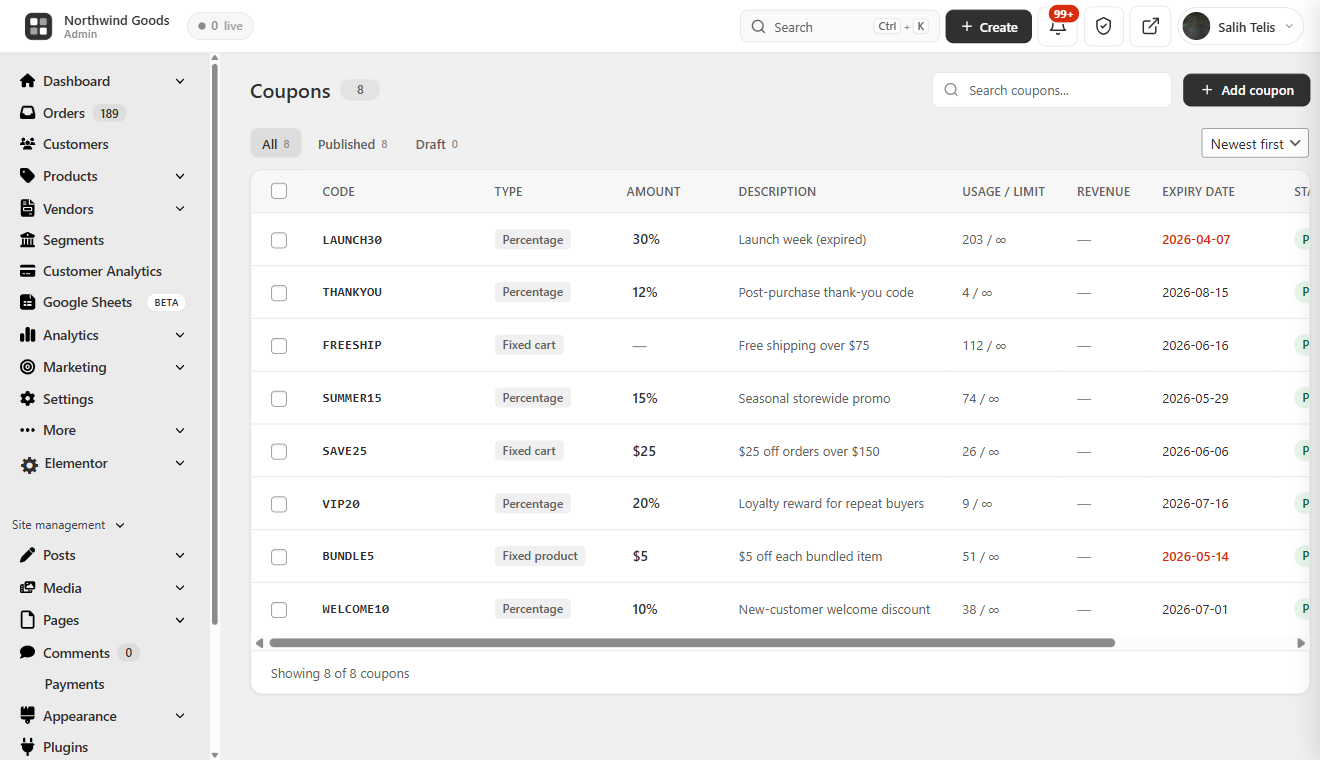
A complete WooCommerce coupon manager that makes coupons a first-class part of the admin — we honestly think this is the best WooCommerce coupon plugin in the free repository.
- Coupon table with code copy-to-clipboard, discount type icon, amount, usage count, expiry highlighting, and status
- Status tabs, AJAX pagination, slide-over coupon panel — create/edit without a reload
- Auto-generate random coupon codes; one-click duplicate
- Discount types: percentage, fixed cart, fixed product + free shipping toggle
- Expiry date picker, total + per-customer usage limits, min/max spend, individual use toggle, product/category include/exclude rules
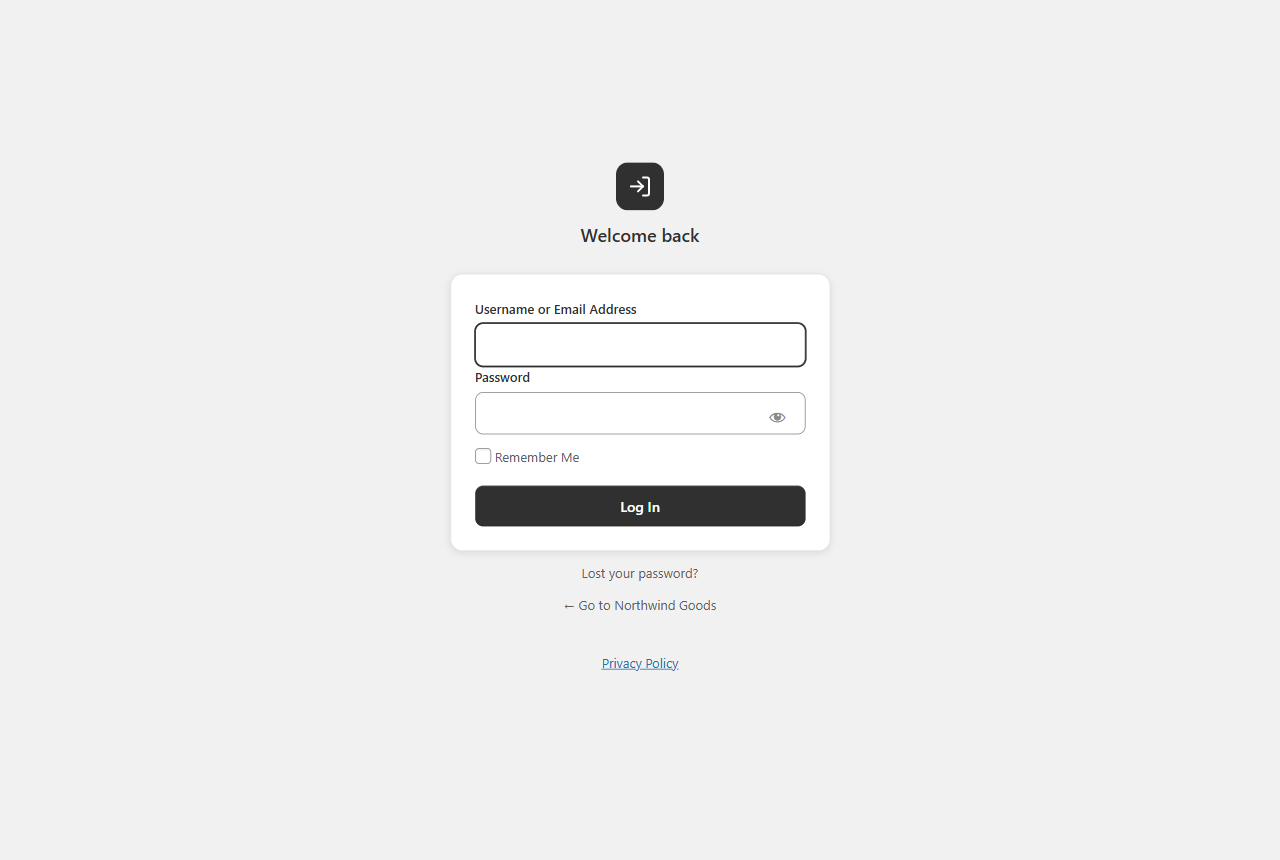
Custom WordPress Login Page — Custom WP Login Page for WooCommerce
BrikPanel ships a custom WP login page that fully replaces the default wp-login.php look — a real WordPress login customizer built for WooCommerce stores.
- Centered card layout with your site name as logo
- Minimal, distraction-free fields, AJAX submission (no reload)
- Toast notification on errors, footer site branding
- Default WordPress login styles fully hidden
WooCommerce Inventory Management
BrikPanel includes a complete woocommerce inventory management workspace. The product list, bulk editor, variation editor, and quick edit sidebar work together as one inventory workflow.
- Current stock for every product and variation in one place, with stock badges in the product list (in stock / low stock / out of stock)
- Update stock inline from the quick edit sidebar, or bulk update across categories and variations
- HPOS-enabled stores supported
A free woocommerce inventory management plugin that covers the daily workflow without installing another heavy stock control plugin.
Custom Top Admin Bar & Notifications
A Custom BrikPanel-styled top admin bar replaces the default WordPress toolbar across the entire admin with a larger, e-commerce-focused notification bell and quick links — toggleable from settings. Notification sound, confetti animation and a top-right popup the moment a new completed order arrives.
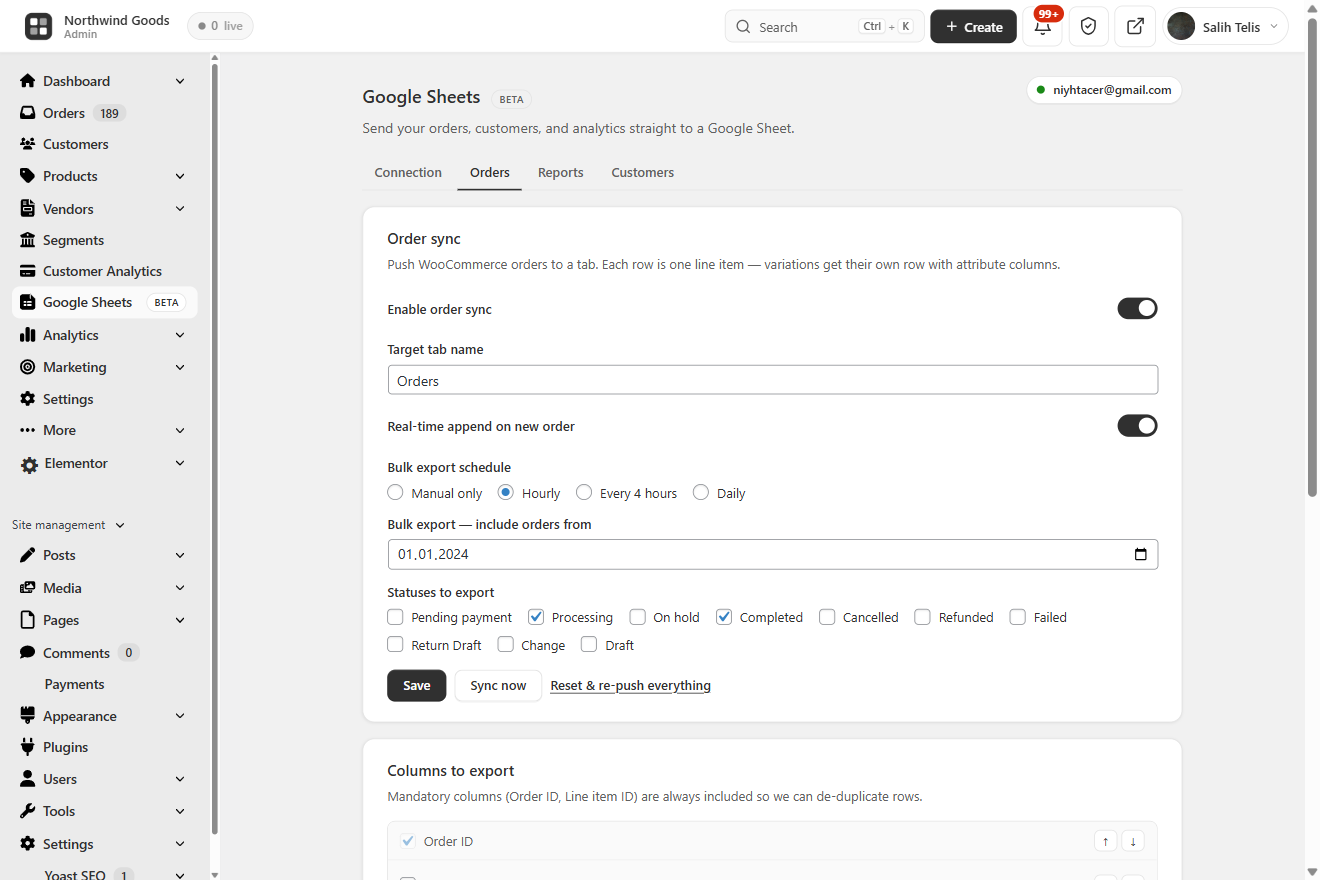
Google Sheets Sync — Real-Time WooCommerce Google Sheets Integration
BrikPanel ships a free WooCommerce Google Sheets sync — a fully native WooCommerce to Google Sheets integration that streams orders, customers and analytics into a Google Sheet you control. The free GSheetConnector alternative with no Zapier, no Make, no monthly fee.
- Real-time order sync — every new WooCommerce order is appended within seconds, one row per line item so variations get their own columns. Free woocommerce order sync to google sheets with no external automation tool
- Scheduled WooCommerce Google Sheets export — hourly, every 4h or daily catch-up; idempotent so re-runs never duplicate rows
- Analytics report snapshots — Sales Summary, Daily KPIs, Top Products and Funnel tabs refreshed on an interval for pivots and dashboards in Sheets
- Customer + RFM snapshot — chained to the nightly RFM recompute
HPOS-compatible. A real google sheets woocommerce sync for stores that want orders, customers and analytics in Sheets without paying a monthly fee.
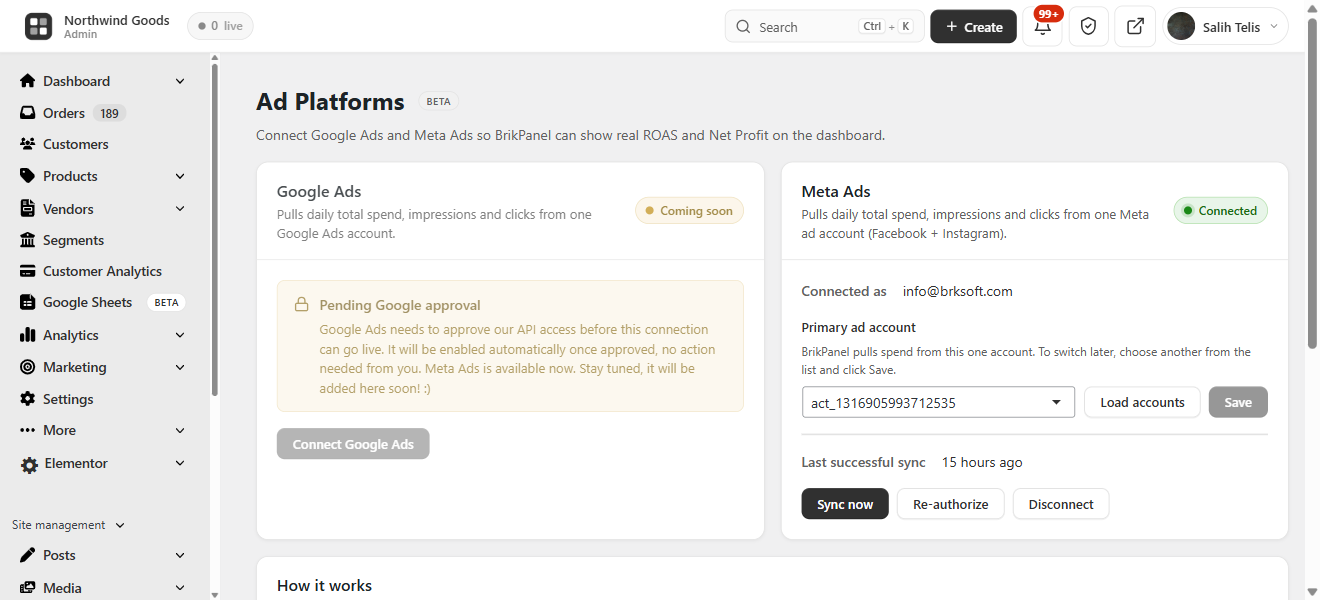
WooCommerce ROAS, Net Profit & Ad Spend — Google Ads + Meta Ads
BrikPanel pulls daily spend from Google Ads and Meta Ads (Facebook / Instagram) so you see real WooCommerce ROAS, Net Profit and ad spend next to revenue. Multi-currency aware. A free Triple Whale alternative and woocommerce profit tracking dashboard with no monthly fee.
BrikMarket Marketplace Analytics
When BrikMarket is active, marketplace orders are excluded from the storefront conversion rate and a dedicated dashboard block breaks down orders, share and top categories per marketplace.
Subscription & Membership Plugin Compatibility
Compatible with major subscription and membership plugins (WooCommerce Subscriptions, MemberPress, Paid Memberships Pro and more) — subscription products and member orders show up in the same product list, order screens and customer analytics.
Developer Hooks & Filters
A developer hooks and filters system for agencies — actions and filters like brikpanel_after_product_save, plus a built-in docs popup in settings with one-click copy buttons.
Navigation & Admin UI Cleanup
- BrikPanel dashboard becomes the first WordPress admin menu item; admin bar gains quick links, footer rebranded
- Optional simplified mode hides the full WordPress menu, showing only BrikPanel + WooCommerce for non-technical clients
A Free, Self-Hosted WooCommerce Analytics & Inventory Suite
Store owners pay monthly SaaS fees for parts of what BrikPanel does free:
- Self-hosted WooCommerce analytics — sales, AOV, conversion, funnels, geo data, customer LTV, RFM, cohort retention, no third-party
- A simpler inventory workspace for stores that only need stock-level visibility and bulk updates
- A free Metorik and Triple Whale alternative — analytics, ROAS and profit on your own server
- Shopify alternative for WooCommerce — the clean admin experience of Shopify with your storefront, customer data and orders on your own server
Why BrikPanel and not the default WooCommerce admin?
WooCommerce’s built-in analytics are slow, refresh hourly, and have no live visitor tracking, conversion funnel, geographic data, customer LTV / RFM / cohort reports, Cmd+K order search, quick edit sidebar, variation bulk editor, custom login or coupon manager. BrikPanel fixes every one of those gaps inside a single free WooCommerce admin plugin.
WooCommerce HPOS Compatibility & Performance
- Zero impact on storefront speed — only loads inside wp-admin
- Hardened performance for low-resource hosting — heavy queries are batched, cached and run through Action Scheduler so the dashboard, customer analytics and bulk editor stay responsive on shared hosting
- HPOS (High-Performance Order Storage) fully supported with dual code paths
- WooCommerce 7.x, 8.x, and newer; works alongside Admin Menu Editor, Slider Revolution, Yoast SEO, RankMath, WPML, Polylang
- Translation-ready (
.potfile included), with all JavaScript / jQuery strings routed throughwp_localize_script - All AJAX actions verify nonces and
manage_woocommercecapability; DB writes use prepared statements; IPs SHA-256 hashed; admin activity excluded from analytics
Screenshots
Installation
- Upload the plugin files to
/wp-content/plugins/brikpanel, or install via Plugins Add New Upload Plugin. - Activate through the Plugins menu.
- Open BrikPanel in the admin sidebar — the dashboard loads immediately.
- (Optional) Visit WooCommerce Settings BrikPanel to enable or disable specific modules.
That is it. No license key, no email signup, no external account.
FAQ
-
Is BrikPanel really 100% free?
-
Yes. Every feature on this page is in the free version. There is no premium tier, no feature lock, no trial period, no upsell. We built this because we needed it for our own 1000+ WooCommerce stores and decided to release it.
-
Is BrikPanel a self-hosted WooCommerce analytics solution?
-
Yes. BrikPanel gives you a complete WooCommerce analytics suite that runs entirely on your own server with no external dependencies. Sales analytics, product reports, conversion tracking, customer LTV, RFM segmentation, cohort retention and customer data are all included — nothing is sent to any third-party SaaS.
-
Does BrikPanel include a WooCommerce sales report?
-
Yes. The BrikPanel dashboard ships a complete WooCommerce sales report out of the box — total sales, total orders, average order value (AOV), refunds, and net revenue, each with a ±% period-over-period delta. Filter the sales report by today, yesterday, last 7 days, last 30 days, or any custom date range. The sales chart is rendered with Chart.js and pairs with the order status donut and conversion funnel for a full sales report you can read at a glance, without ever leaving wp-admin and without paying for an external analytics service.
-
Does BrikPanel offer custom WooCommerce reports, KPIs and a profit report?
-
Yes. The dashboard goes far beyond the built-in screens with a complete set of WooCommerce reports and WooCommerce sales analytics computed live from your own store data: sales, orders, AOV, conversion rate, customer LTV, RFM segments and cohort retention. Every headline metric is shown as a WooCommerce KPI card with a period-over-period delta, and a real profit report (revenue minus COGS, ad spend and manual expenses) sits right next to revenue. Because the LTV, RFM, cohort and geographic views are not part of core, BrikPanel effectively ships advanced reports for WooCommerce and custom WooCommerce reports as a free, self-hosted WooCommerce reporting layer, with no external SaaS and nothing sent off your server.
-
Can I customize the dashboard widgets, sales charts and graphs?
-
Yes. The BrikPanel admin dashboard is built from modular dashboard widgets (sales, orders, AOV, the conversion funnel, live visitors, the geographic globe, customer analytics and more), and the modules you do not need can be turned off from WooCommerce Settings BrikPanel. The sales charts and sales graphs are rendered with Chart.js and redraw for any date range you pick, so your custom dashboard shows exactly the sales charts, KPIs and reports you care about and nothing you do not.
-
Does BrikPanel show customer LTV, RFM segments and cohort retention?
-
Yes. BrikPanel ships a full WooCommerce customer analytics suite directly in the dashboard. Customer Lifetime Value (LTV) is calculated for every customer with average, top, and full distribution histogram. RFM segmentation scores every customer on Recency, Frequency and Monetary and groups them into Champions, Loyal, At Risk, About to Sleep, Hibernating and Lost. Cohort retention shows a month-by-month grid plus an average retention trend line. All three are computed from your own store data — no external service involved.
-
Is BrikPanel a free Shopify alternative for WooCommerce?
-
Yes, for store owners who want to stay self-hosted. BrikPanel gives your WooCommerce store the clean, modern admin experience of Shopify — product list with inline editing, bulk price and stock updates, live visitors, conversion tracking, geographic analytics, customer LTV / RFM / cohort reports, a branded login page — but your storefront, your customer data, and your orders stay on your own server. No monthly platform fee, no transaction fee, no vendor lock-in. If you were evaluating Shopify but want to own your stack, this is the Shopify alternative for WooCommerce we built for that exact use case.
-
Is BrikPanel an ATUM alternative for inventory management?
-
For most stores, yes. BrikPanel includes complete woocommerce inventory management — stock levels, low stock badges, bulk stock updates, variation stock updates — all integrated into the same dashboard you use for sales and orders. If you only need daily stock work without advanced supplier or purchase order features, BrikPanel is a much lighter ATUM alternative.
-
How do I get a faster WooCommerce product list with bulk actions and quick edit?
-
The default WooCommerce product list is built for browsing — searching, sorting and editing it is slow. BrikPanel ships a complete woocommerce product list plugin with thumbnail, SKU, regular and sale price, stock badge, category, AJAX pagination, live search, status tabs, one-click publish toggle and a slide-in quick edit panel for every row. Works on both simple and variable products, and the same woocommerce product list screen powers the bulk price and bulk stock updates so you never leave the page to edit your catalog.
-
How do I bulk edit WooCommerce products including variations?
-
Open BrikPanel Products and click the Bulk Update button in the toolbar. You can update prices, sale prices, and stock for all products, by category, or for selected products. For variable products, open any product, click Edit Variations, and bulk update prices and stock across every variation in one modal. This is the part most free WooCommerce bulk editor plugins do not handle — BrikPanel does.
-
Can I bulk edit variation prices in WooCommerce with the free version?
-
Yes. Bulk edit variation prices WooCommerce is a core BrikPanel feature, and it is free. Set a percentage rule, set a fixed price, or update by attribute (every “Red” variation, every “Large” size). The same modal handles bulk update variation stock for the same products.
-
Does BrikPanel slow down my WooCommerce store?
-
No. BrikPanel only loads inside wp-admin. It has zero impact on your storefront speed, customer experience, page weight, or Core Web Vitals. The frontend never loads any BrikPanel code.
-
Is BrikPanel compatible with HPOS (High-Performance Order Storage)?
-
Yes. Every order query has dual code paths —
wc_get_orders()for HPOS,WP_Queryfor legacy. BrikPanel declares HPOS compatibility viaFeaturesUtil::declare_compatibility('custom_order_tables', ...)and is tested on stores running both modes. -
How do I see WooCommerce sales by country?
-
Open the BrikPanel dashboard. Scroll to the geographic analytics section. The 3D globe shows every order on its real geographic location, and the Top 10 Countries and Top 10 Cities tables update in real time. BrikPanel extracts country and city from the billing or shipping address of every order, so this works with no extra setup.
-
How do I customize the WordPress login page for my WooCommerce store?
-
BrikPanel includes a built-in wordpress login customizer. Enable the custom wp login page module from BrikPanel settings and the default
wp-login.phpis replaced with a clean, branded login form that matches the rest of the BrikPanel admin. No CSS knowledge required. -
How do I search WooCommerce orders by customer name or phone number?
-
Press
Ctrl + K(orCmd + Kon Mac) anywhere inside wp-admin. The BrikPanel quick search overlay opens and searches across order ID, customer name, email, phone, and product SKU at the same time. This is the woocommerce search orders experience the WooCommerce admin should ship with by default. -
Can I see who is on my WooCommerce store right now?
-
Yes. BrikPanel includes a woocommerce live visitors widget on the dashboard that updates every 30 seconds. You can see what page each visitor is on, whether they have items in the cart, and whether they are an existing customer. This is real woocommerce real time visitors tracking, not estimates.
-
Does BrikPanel track WooCommerce conversion rate and conversion funnel?
-
Yes. BrikPanel includes a complete woocommerce conversion tracking system that records visitors, add-to-cart events, checkout starts, and completed orders. The dashboard shows your woocommerce conversion funnel as a four-step visual: Visitors Add to Cart Checkout Orders, with the conversion percentage at every step.
-
Is there a free WooCommerce conversion tracking plugin built into BrikPanel?
-
Yes. BrikPanel ships a free WooCommerce conversion tracking plugin that records every visitor, add-to-cart, checkout start and completed order in your own database — no Google Analytics setup, no Hotjar, no monthly fee. The funnel and conversion-rate widgets on the dashboard are computed from this same dataset in real time.
-
How do I sync WooCommerce orders to Google Sheets for free?
-
Open WooCommerce BrikPanel Google Sheets, click “Connect Google account”, pick or create a target spreadsheet, and toggle “Real-time order sync” on. Every new WooCommerce order is then appended to your Sheet within seconds, with one row per line item so variations land in their own columns. Status changes update the existing row in place. No Zapier, no Make, no monthly fee — a real woocommerce google sheets sync built into BrikPanel.
-
Does BrikPanel work as a free GSheetConnector or WPSyncSheets alternative?
-
Yes. BrikPanel includes a complete WooCommerce to Google Sheets integration in the free version — real-time order sync, scheduled bulk export, analytics snapshot tabs (Sales Summary, Daily KPIs, Top Products, Funnel) and a customer + RFM snapshot. All four flows ship free with no row limit, no premium tier, and OAuth-based authentication that requests minimum scopes only (
drive.file— never full Drive access). -
How do I see real ROAS and net profit in WooCommerce?
-
Connect Google Ads and/or Meta Ads from the BrikPanel Ad Platforms page. BrikPanel then pulls your daily ad spend and shows three new dashboard cards: Ad Spend (summed across every connected platform for the active date range), WooCommerce ROAS (store revenue ÷ ad spend), and Net Profit (revenue − COGS − ad spend − manual expenses). COGS comes from WooCommerce’s native order cost meta and expenses from the BrikPanel expenses table, so the woocommerce roas and net profit numbers are real, not estimates. The cards are multi-currency aware — if an ad account reports in a different currency than the store, spend is shown split and ROAS / Net Profit are omitted instead of printing a misleading converted number.
-
Is BrikPanel a free Triple Whale alternative for WooCommerce?
-
For self-hosted stores, yes. BrikPanel gives you the WooCommerce ROAS and net profit view store owners buy Triple Whale, TrueProfit or BeProfit for — daily Google Ads and Meta Ads spend pulled in next to store revenue, COGS and expenses — but it runs entirely on your own server with no monthly fee and no data sent to a third party. If you only need true ROAS and profit (not full multi-touch ad attribution), this is the free Triple Whale alternative built for that exact use case.
-
Does BrikPanel connect to Google Ads and Meta (Facebook / Instagram) Ads?
-
Yes. BrikPanel connects to both Google Ads and Meta Ads through a secure OAuth proxy (the plugin only ever stores encrypted tokens, never your password). It pulls daily spend per platform, backfills history, and re-syncs recent days automatically so the dashboard ROAS and net profit stay accurate. The integration is spend-and-profit focused — it does not install a Facebook pixel or do multi-touch attribution; it gives you true woocommerce roas and net profit without a paid SaaS.
-
Is there a free WooCommerce variation editor for bulk price and stock updates?
-
Yes. BrikPanel includes a complete WooCommerce variation editor in the free version. Open any variable product, click “Edit Variations”, and you can bulk update every variation’s price, sale price, stock and SKU in one modal — with attribute filtering when a product has 50+ combinations. The same woocommerce variation editor also supports per-attribute rules (“set every Red variation to $X”).
-
What makes BrikPanel different from the built-in WooCommerce analytics?
-
The built-in WooCommerce analytics are slow, refresh on a delay, only show historical data, and have no live visitor tracking, no conversion funnel, no geographic globe, no customer LTV / RFM / cohort reports, no Cmd+K order search, no quick edit sidebar, no variation bulk editor, no custom login page, and no coupon manager. BrikPanel adds every one of those features inside a single free plugin.
-
Is BrikPanel just a CSS reskin of the WooCommerce admin?
-
No. BrikPanel is a real woocommerce admin dashboard plugin with custom database tables for visitor tracking, custom AJAX endpoints for every interaction, real conversion analytics, a working bulk editor, a real product editor, a real coupon manager, and a real custom login system. Other plugins (Dashify, UiPress) only restyle the admin. BrikPanel rebuilds the parts of WooCommerce that needed to be rebuilt.
-
Can I use BrikPanel as a WordPress admin theme or admin skin for my store?
-
In practice, yes. BrikPanel is built specifically for WooCommerce, but for store owners it behaves like a focused WordPress admin theme: it reskins the WooCommerce parts of wp-admin into a clean, Shopify-style custom admin panel, replaces the default toolbar, and restyles the product, order, customer and coupon screens. If you have been looking for a wp admin theme or an admin skin that makes the WooCommerce admin genuinely pleasant to work in (rather than a generic restyle that breaks on the next WooCommerce update), this is built for exactly that. You can also hide admin menu items for non-technical clients with the optional simplified mode, leaving only BrikPanel and WooCommerce in the sidebar.
-
Does BrikPanel work with Yoast SEO, RankMath, Elementor, WPML, and Polylang?
-
Yes. BrikPanel does not interfere with frontend rendering, so it works with every page builder and SEO plugin we have tested. Yoast SEO, Rank Math, All in One SEO and SEOPress metaboxes (including their SEO score panels) render and save inside the BrikPanel product editor. It also has its own translation files and is fully compatible with WPML and Polylang for multilingual stores.
-
Does BrikPanel work with WooCommerce Subscriptions and membership plugins?
-
Yes. BrikPanel is compatible with WooCommerce Subscriptions, Subscriptions for WooCommerce (WP Swings), MemberPress, Paid Memberships Pro, WooCommerce Memberships, YITH WooCommerce Subscription, SUMO Subscriptions, WebToffee Subscriptions for WooCommerce and Restrict Content Pro. Subscription products and member orders show up in the same product list, order screens and customer analytics as the rest of your catalog.
-
Where does BrikPanel store data?
-
Everything stays in your WordPress database. BrikPanel creates three custom tables:
wp_brikpanel_visitors,wp_brikpanel_cart_tracking, andwp_brikpanel_visited_pages. Live visitor data is stored in a transient that auto-expires every 2 minutes. Your store, order, customer and visitor data is never sent anywhere. BrikPanel only contacts an external service for optional features you switch on yourself, described in the next question. -
What data does BrikPanel send outside my site?
-
By default, nothing. BrikPanel only contacts an external service for features you explicitly opt into:
- BrikMentor early access (optional). After 100 completed orders, or from a dismissible card on the dashboard, BrikPanel may invite you to join the waiting list for BrikMentor, an upcoming separate AI assistant and email marketing platform. Only if you type your email address and tick the consent box is that email (and, if you answer the optional follow-up, which marketing tool you use) sent to our server at brksoft.com so we can email you the beta invite. Nothing is sent unless you fill in the form and consent, and you can unsubscribe at any time. Privacy policy: https://brksoft.com/privacy-policy/ . Terms: https://brksoft.com/terms-and-conditions/
- Google Sheets sync and Google / Meta Ads (optional). If you connect these, BrikPanel exchanges data with Google, Meta and our authentication helper at brksoft.com to run the sync and read your ad spend. They only run after you connect the relevant account.
-
Will BrikPanel always be free?
-
Yes. The dashboard, the bulk editor, the inventory tools, the order management, the coupon manager, the custom login, the conversion tracking, the customer analytics suite, and every other feature listed above will remain free forever. We may release a separate paid product (BrikMentor) on top of BrikPanel in the future, but it will be additive — BrikPanel itself stays 100% free.
Reviews


Contributors & Developers
“BrikPanel — WooCommerce Dashboard, Sales Report, Google Sheets Sync, Inventory Management & Bulk Editor” is open source software. The following people have contributed to this plugin.
Contributors
Interested in development?
Browse the code, check out the SVN repository, or subscribe to the development log by RSS.
Changelog
3.1.39 (2026-06-26)
- New: Add images to the product description. The description editors (both the long description and the short description, on simple and variable products) now have an “Insert image” button that opens your media library. You can set the image’s alt text, its alignment (None, Left, Centre or Right) and its size (Small, Medium, Large or Full, that is roughly a quarter, half, three-quarters or the image’s natural width). Click an image you have already inserted to change its alignment, size or alt text, or to swap it for another. No more closing BrikPanel to add a picture with the classic editor
- New: Open description images in a lightbox. While inserting or editing an image, tick “Open in a lightbox when clicked” and that image opens in a clean full-screen overlay on the product page when a shopper clicks it (click to enlarge, then close with the backdrop, the X button or the Esc key). The small lightbox script only loads on product pages that actually use it, so storefront performance is unaffected
- Improvement: Keep typing straight after inserting an image. The cursor is now placed right after a newly inserted image, so you can carry on writing without having to click back into the editor
3.1.38 (2026-06-25)
- Fix: Google Sheets product sync no longer creates duplicate rows for variations (or any product). When a stock or price change was pushed but the plugin had lost track of which sheet row a product lived on, for example after a network hiccup dropped Google’s reply or an earlier full sync was interrupted, the next push could add a second row for the same item. The push now reconciles against the Product ID already in the sheet and updates that existing row instead of appending a duplicate. Variations and their parent product are protected the same way. Run “Sync now” once to clear any duplicate rows a previous version left behind
3.1.36 (2026-06-22)
- New: The product editor’s attributes and variations section was redesigned. The card now has a clean header (the “Variable product” title, a short description and the toggle) above a tidy body, matching the rest of the editor, instead of the previous stacked grey text. The plain attribute drop-down is replaced with a modern, searchable picker: click the field, type to filter your global attributes, and press Enter to add the match. The free-text “add a value” box and its Add button are now one joined input, and the “Size and Color” shortcut moved into a clear “Quick add” chip. Every action behaves exactly as before, on both simple and variable products
- New: Drag to reorder attribute rows. Each attribute row now has a drag handle, so you can reorder your attributes the way WooCommerce does. Because the order decides how variation names are built, reordering marks any already-generated variations as needing a refresh and prompts you to regenerate them
- Fix: WooCommerce’s “Customer history” and “Order attribution” boxes are back on the modern order screen. Both boxes carry useful native data and were being hidden by mistake; they now show with BrikPanel’s card styling. Only the raw “Custom Fields” box (already replaced by BrikPanel’s “Additional details” card) and the download-permissions box stay hidden
- Fix: The “Order actions” box no longer looks broken with the CURCY multi-currency plugin. CURCY adds a currency selector and a note to that box; the selector now sits on its own full-width row with the note as small helper text underneath, and the Trash and Update buttons line up correctly. Stores without CURCY are unchanged
- Improvement: Security and reliability hardening of the attributes and variations editor. The data the editor embeds in the page is now safely encoded so attribute or term names imported from elsewhere can never break out of the script, saving and the variation preview now run a per-product permission check, and creating a new term or global attribute is limited to users allowed to do so. Removing a taxonomy attribute from a product now cleans up its old term links, a sensible upper limit guards against a runaway number of variations, and several smaller fixes make the variation preview race-safe and stop duplicate attribute rows. Works on both simple and variable products
Earlier versions
For the complete release history (and all earlier versions), see changelog.txt bundled with the plugin.