
Description
Plugin Demo | Documentation | Support | Tutorials | Get Pro
WP Table Builder is a drag and drop table builder plugin for WordPress. It’s insanely easy to create responsive tables with WP Table Builder.
WP Table Builder is perfect for creating comparison tables, pricing tables, list tables and many more.
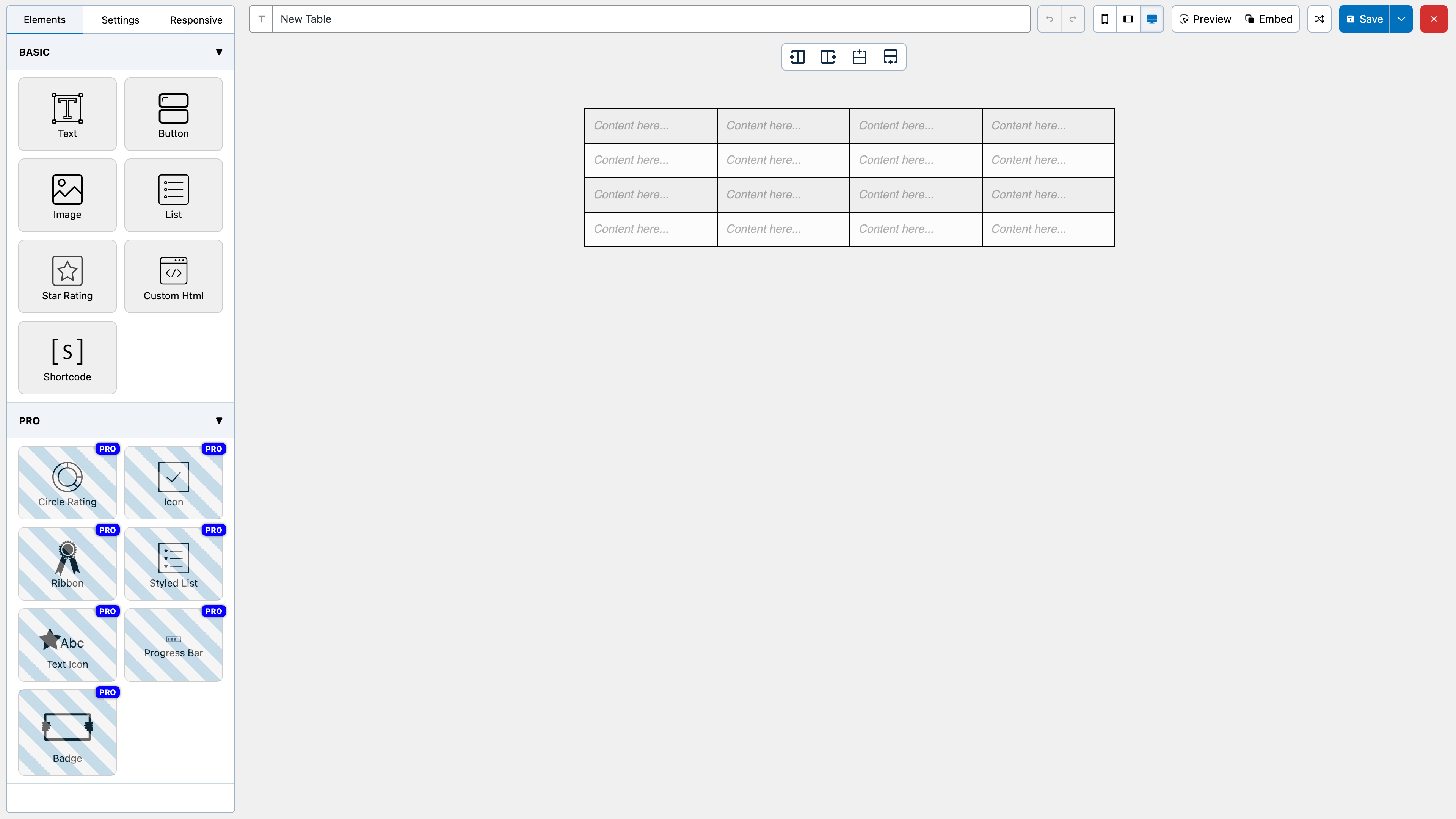
The builder comes with 7 elements right now. You can add the following elements in a table:
- Text
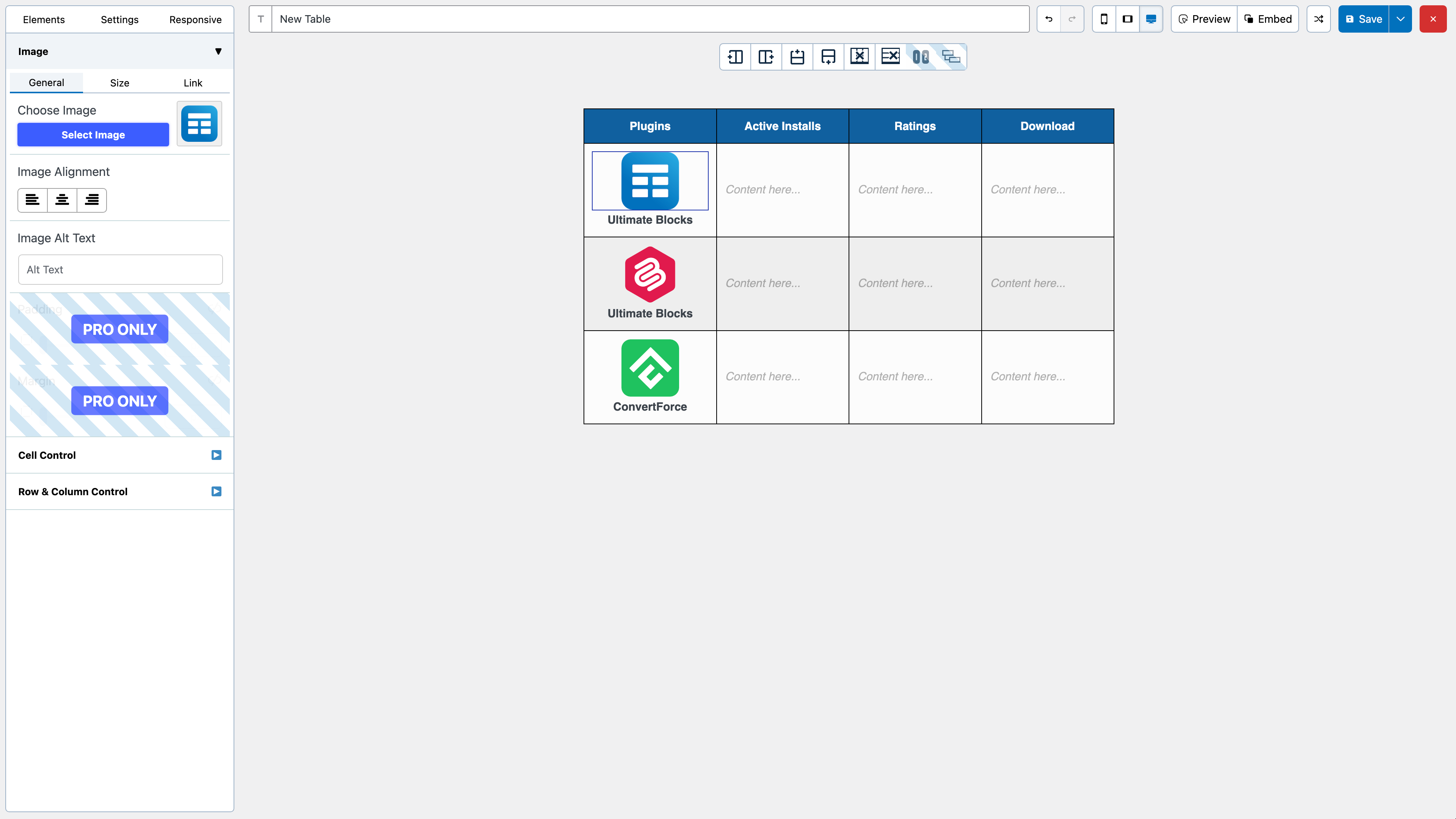
- Image
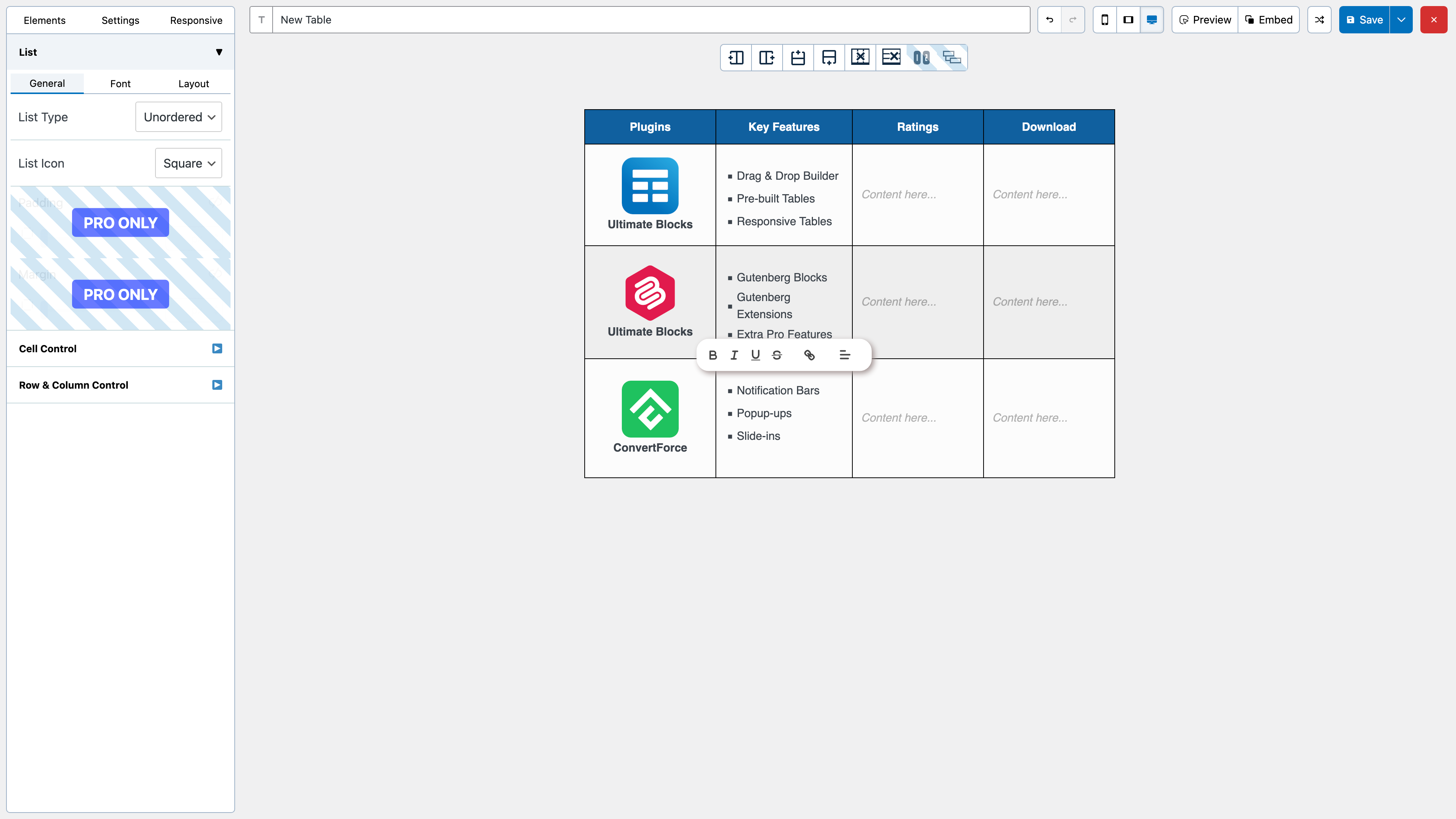
- List
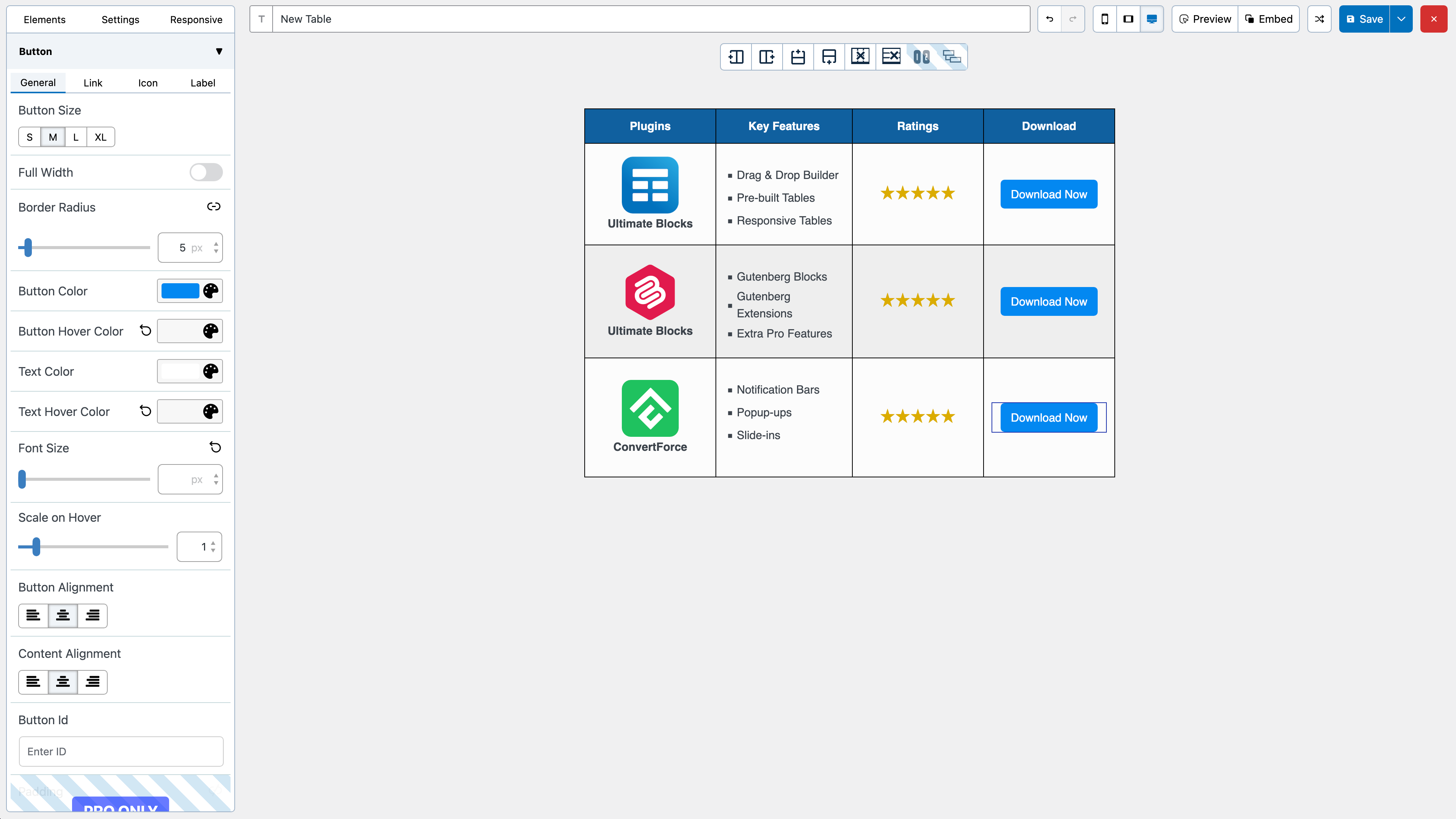
- Button
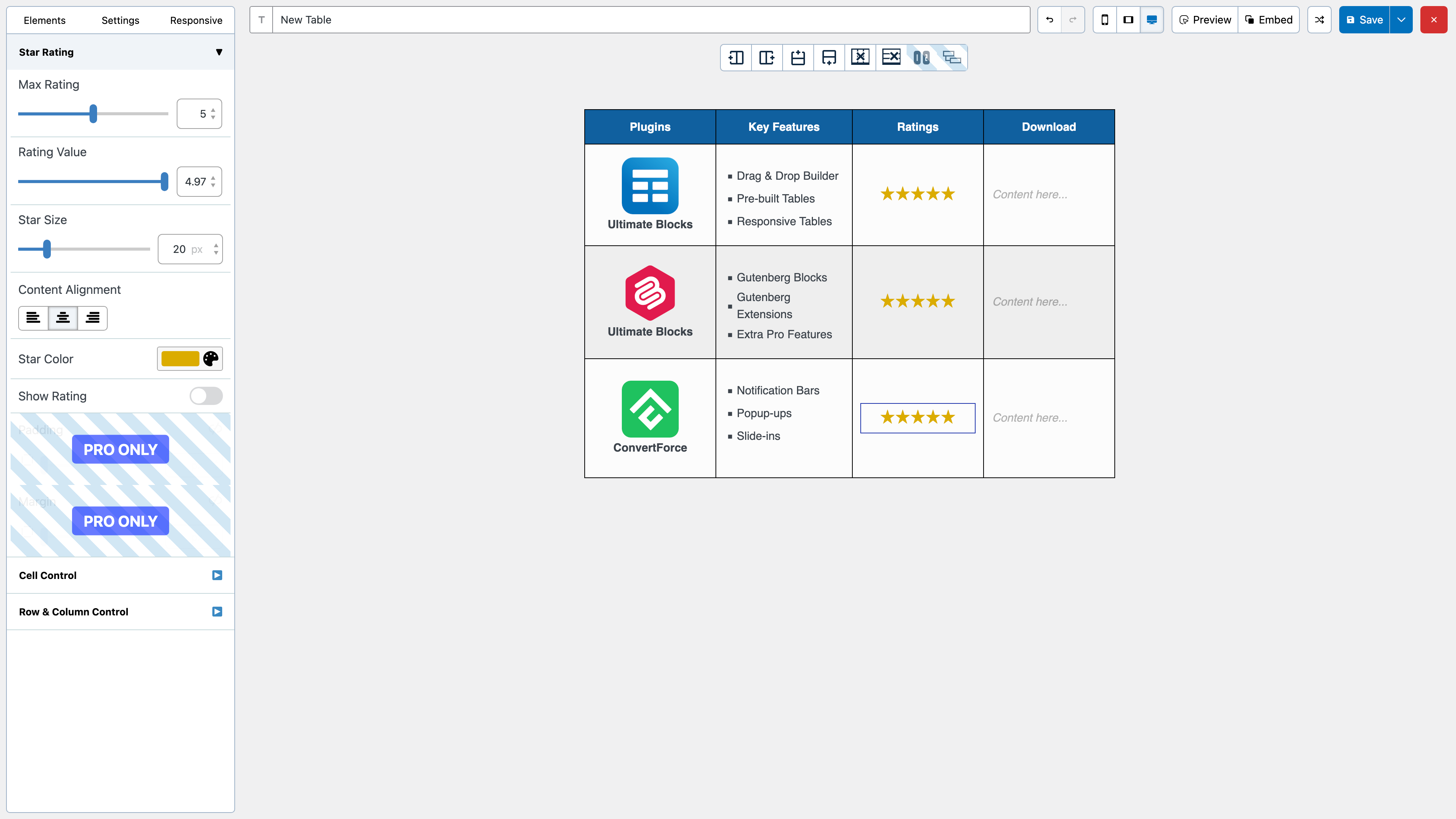
- Star Rating
- Custom HTML
- Shortcode
All the elements come with customization options of their own.
We have a cell management mode which comes with options like Add New Row, Add New Column, Merge Cells, Split Cells and many more.
How to Use
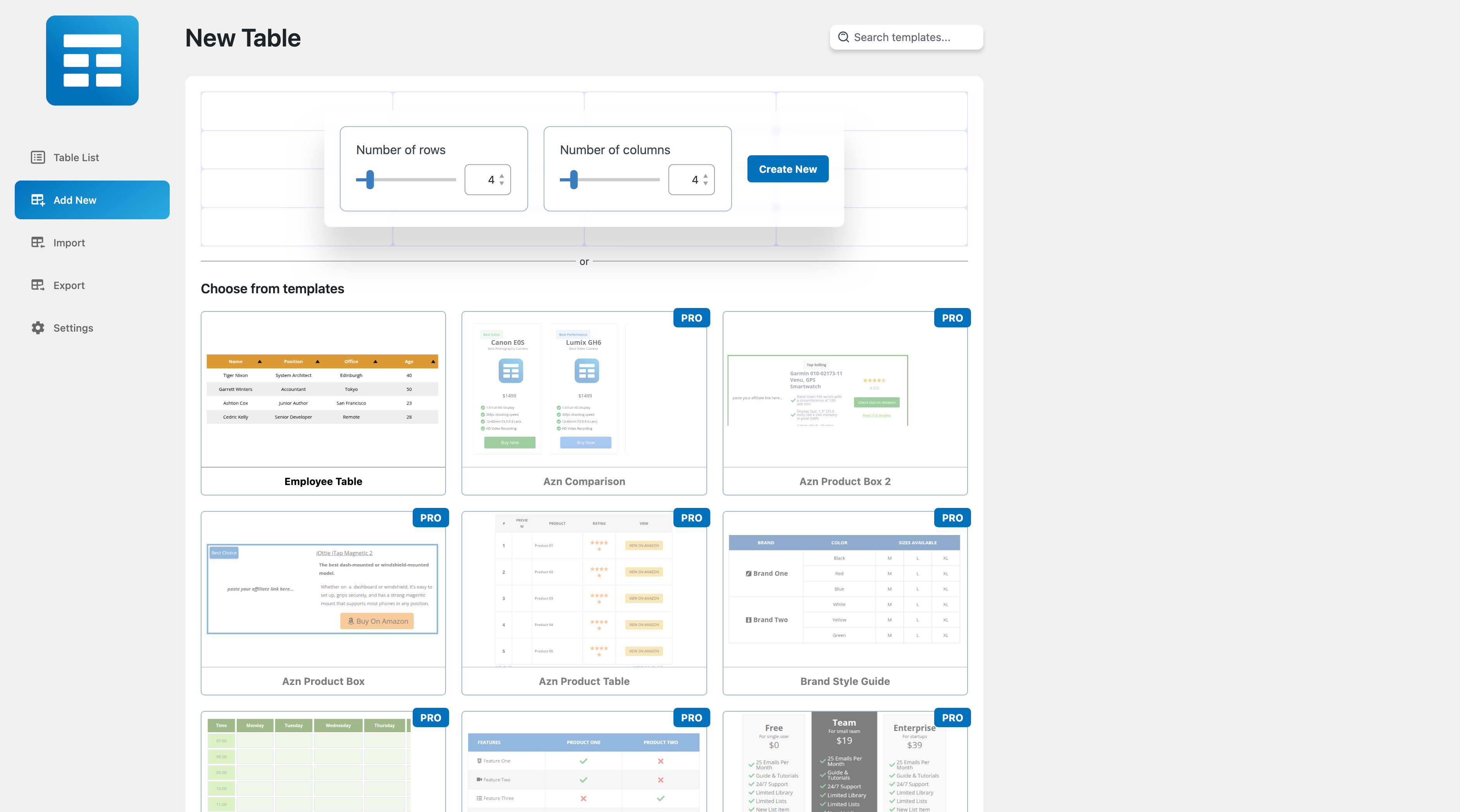
After you install the plugin, you will see a Table Builder menu. Go to Table Builder > Add New.
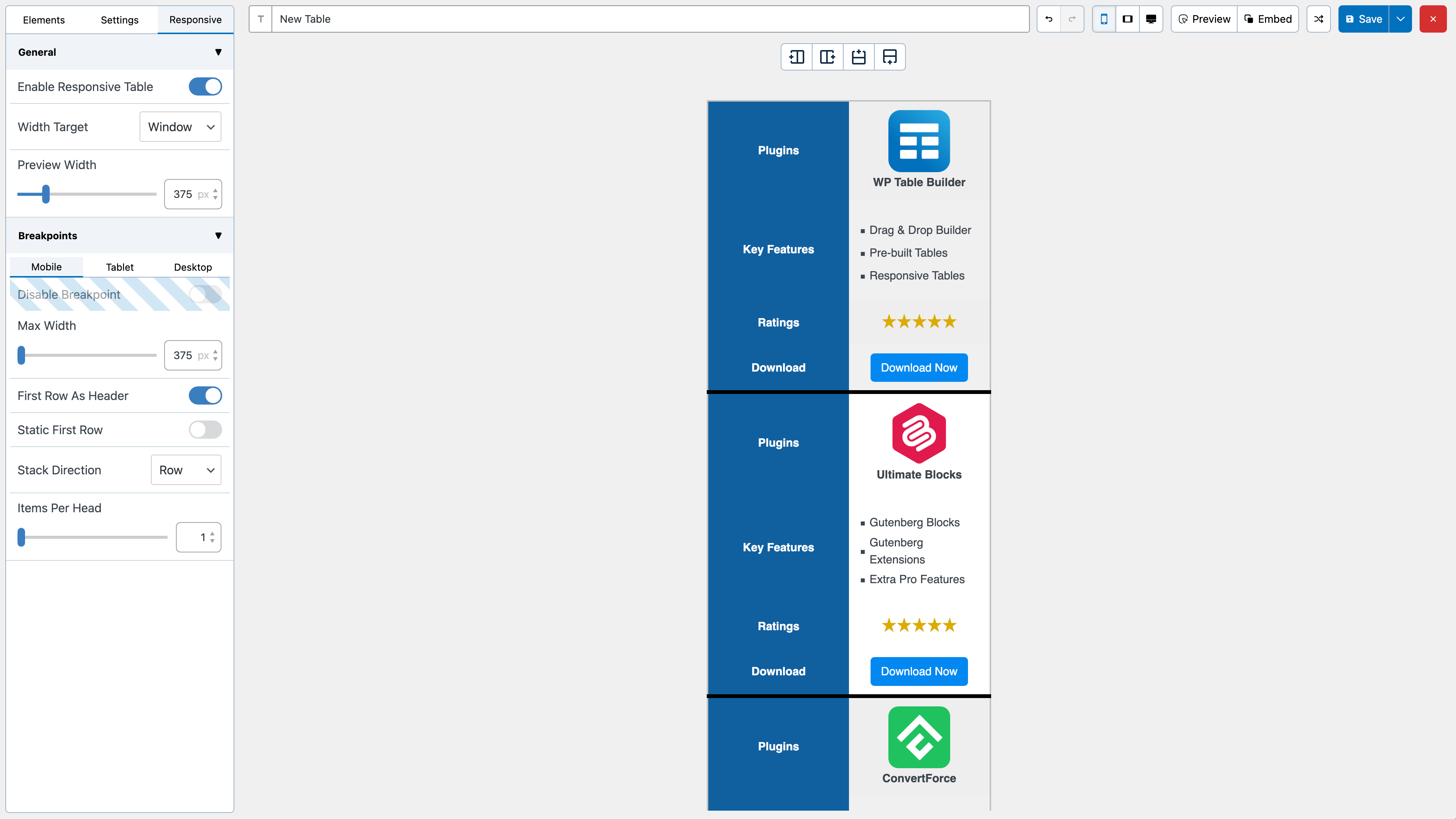
You will be able select column number and row number. Once you select that, click on Generate. The table will be generated.
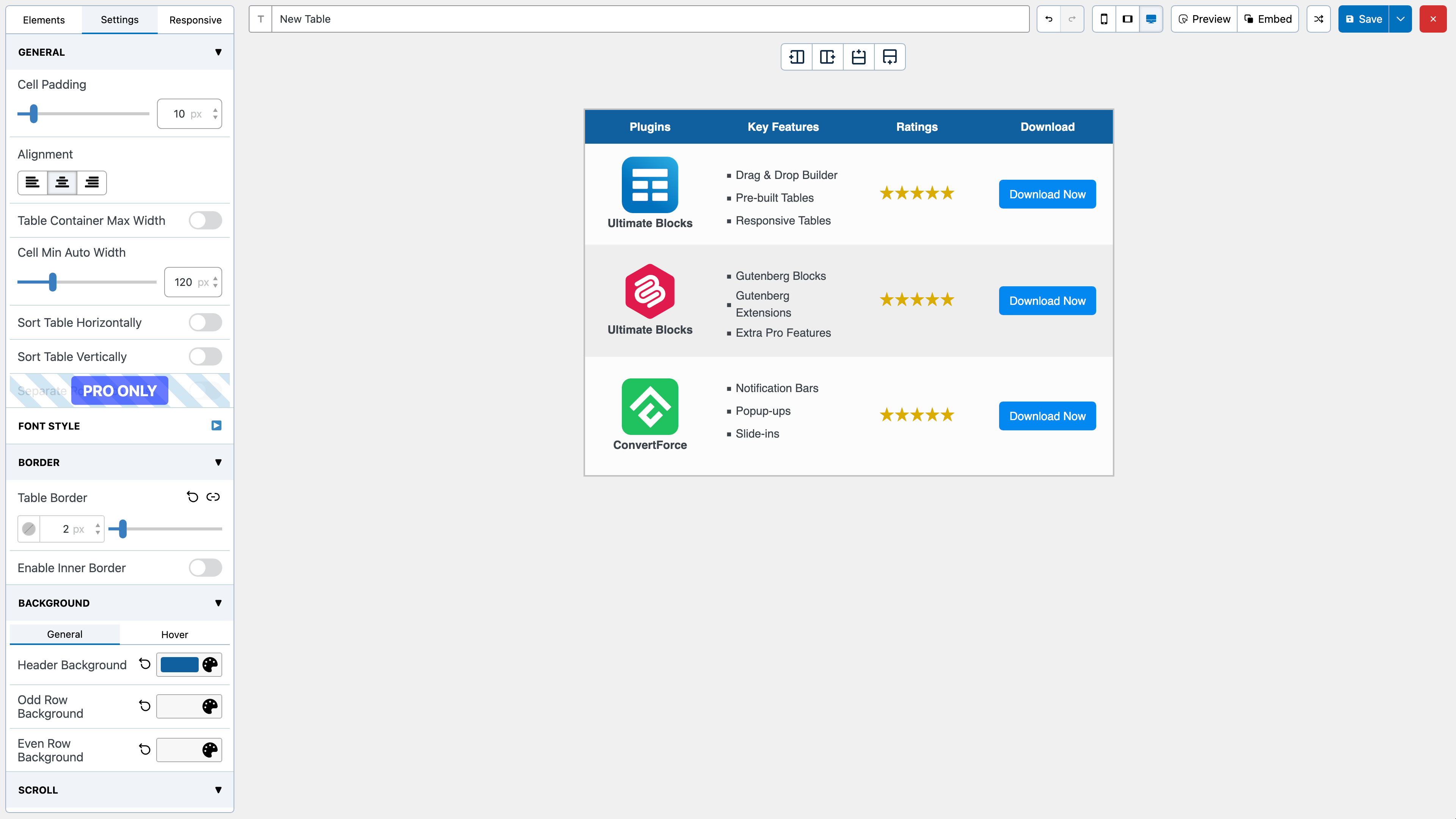
You can then drag and drop elements from the left panel into the table cells. Once you are done adding and editing elements, click on Save to save the tables.
After the table is saved, you can embed it in post and pages by using a shortcode. Click on ‘Embed’ on the top to get the shortcode.
You can also get the shortcode from the ‘All Tables’ list under ‘Table Builder’ menu.
Import Tables
You can import tables from CSV or XML files. You can import both single and multiple CSV or XML files. Multiple files will have to be zipped.
You can also import tables from TablePress plugin.
Export Tables
Just like importing you can export the tables to CSV or XML files.
If you are looking to move tables created with WP Table Builder to another site, XML is the better choice as it will preserve table settings.
Join Us To Get Updates and Resources
Screenshots
Blocks
This plugin provides 1 block.
- WP Table Builder WP Table Builder – Drag and Drop Responsive Table Builder Plugin for WordPress
FAQ
Installation Instructions
Please remember you MUST have PHP 5.6+ to be able to use this plugin.
- Upload the plugin zip file via the plugin page of WordPress by clicking ‘Add New’ and selecting the zip from your local computer.
- Activate the plugins through the Plugins menu in WordPress.
That’s it. You’re done!
Reviews


Contributors & Developers
“WP Table Builder – Drag & Drop Table Builder” is open source software. The following people have contributed to this plugin.
Contributors


“WP Table Builder – Drag & Drop Table Builder” has been translated into 2 locales. Thank you to the translators for their contributions.
Translate “WP Table Builder – Drag & Drop Table Builder” into your language.
Interested in development?
Browse the code, check out the SVN repository, or subscribe to the development log by RSS.
Changelog
2.2.3
- NEW: Block tree view in the builder
- FIX: Table responsiveness edge case in the frontend
2.2.2
- IMPROVE: Builder performance when editing text
- FIX: Scaled table clipped when scroll is enabled
- FIX: Security improvements
- [PRO] FIX: Styled list icon width
- [PRO] FIX: AI chat box height
2.2.1
- NEW: Welcome page shown after activation
- NEW: Bulk delete for tables in the trash
- IMPROVE: Redesigned export page
- IMPROVE: Import and export feedback is now shown in page
- FIX: Import failures on zip files
- FIX: Default font size on text blocks
- FIX: Security improvements
- [PRO] FIX: Pro is deactivated when the free plugin is deactivated
2.2.0
- NEW: Font system with font selection for text blocks
- NEW: Border radius option for the whole table
- [PRO] NEW: Added option to choose which row/col should be sticky
- [PRO] NEW: Added offset for sticky row/col
- IMPROVE: Updated link picker design and rel options
- IMPROVE: Min-width and scroll for the builder view
- IMPROVE: Moved AI sidebar below toolbar
- FIX: Button font size in the editor
2.1.18
- IMPROVE: Control panel open by default
2.1.17
- IMPROVE: Improved ergonomics
2.1.16
- NEW: AI builder for editing tables with natural language
- IMPROVE: Allow forms and relative elements in html
- IMPROVE: Improved performance when changing table’s props
2.1.15
- IMPROVE: More flexibility in custom styles
- FIX: Default inner border applies on new tables
- FIX: Restore
wptb-cellclass on table cells - FIX: Allow
srcandtitleattributes on input elements
2.1.14
- NEW: Content distribution options
- NEW: Optional “Powered by WP Table Builder” attribution setting
- IMPROVE: Undo support in radio group controls
- IMPROVE: Table list search matches table ID and shortcode
- FIX: Button padding applies correctly to the button background
- FIX: Security improvements
- FIX: Issues when site has trailing slash redirection enabled
2.1.13
- FIX: Saving link target as same window (This window)
- FIX: Row styles shifting when inserting a new row
- IMPROVE: Link target control uses a switch for clearer choices
2.1.12
- NEW: Vertical alignment options per row and column
- FIX: Ctrl+Z in the editor no longer clears unsaved changes
- FIX: Sticky row and column behavior with horizontal scroll enabled
2.1.11
- NEW: Option to use TH cells for the first row
- FIX: Image width and links preservation
- FIX: Purge frontend cache when a table is updated
- FIX: Table preview layout in the builder
- FIX: Preserve link colors
2.1.10
- FIX: strikethrough and text-align not saving
2.1.9
- FIX: Sorting edge case when string starts with a number
- FIX: HTML purifier warnings
2.1.8
- FIX: Security improvements
2.1.7
- FIX: Table style not working in gutenberg
2.1.6
- FIX: Sticky first row & column
- FIX: Sort buttons becoming hidden in some sites
- FIX: Custom styles not working in some cases
2.1.5
- FIX: Saving as template
- FIX: Corner Ribbon Style
- FIX: Table preview width not responding to change in the builder
- FIX: Saving floating point percentage in circle rating & progress bar
- FIX: Hide column on mobile is not working
- FIX: Shortcode not working properly in the frontend
- IMPROVE: Added padding option for the whole table
2.1.4
- IMPROVE: Individual item color and icon options for styled list items
- IMPROVE: Individual item color option for list
- IMPROVE: Persist formatting and links between copy-paste
- FIX: Text color getting overridden
- FIX: Image lazy loading
2.1.3
- FIX: Unordered list displaying as ordered
- FIX: List Item text breaking
- FIX: PHP Compatibility issue
- FIX: Improved style isolation
- IMPROVE: Added recovery option for corrupted tables
2.1.2
- FIX: Version sync from 2.0.x
- IMPROVE: Include file hash in the assets url
- FIX: Responsiveness not working on some edge cases
- FIX: Default odd/even colors in responsive mode
- FIX: Import export functionality
- FIX: Tags functionality
- FIX: Padding not parsing properly
- FIX: Improve row background specificity
- FIX: saving & rendering circle rating type properly
2.1.1
- Re upload to wordpress
2.1.0
- IMPROVE: Removed legacy code and builder
- IMPROVE: Custom style preview is available in the builder
- IMPROVE: Search preview is available in the builder
- IMPROVE: Improved row/column moving UX
- FIX: Colors losing their alpha value
- FIX: Allow adding image from url
- FIX: Table inner border getting lost in some tables
- FIX: Border Color becoming transparent on reset
- FIX: Prevent error when saving table in some sites
2.0.20
- FIX: Securiy improvements
2.0.19
- IMPROVE: Added support for media queries in custom styles
- FIX: Some tables becoming small in mobile devices
2.0.18
- FIX: Sticky first column not persisting
- FIX: Table spacing not working properly for large tables
- FIX: Incorrect versions are shown in the rollback option
- FIX: Error when saving shortcode element
- FIX: Device detection logic for responsiveness
- IMPROVE: Hard limit highlight scaling between 100-105%
- IMPROVE: Make the default items per head = 1 for mobile
2.0.17
- FIX: Scrollable in mobile devices when responsive is enabled
- PRO: FIX: Search & Sort feature not working properly
2.0.16
- FIX: Re-implement responsive algorithm to cover all tables
- FIX: Disable max width not working properly
- FIX: Cell background not working properly in responsive mode
- FIX: Potential issue with cell border & radius
- IMPROVE: Mobile Device starts from 375px
- IMPROVE: Couple responsive tab with device preview button
- IMPROVE: Updated edit table label in gutenberg
- IMPROVE: Font size inconsistency in some websites
- IMPROVE: Updated patterns
- PRO: IMPROVE: Added border radius in badge
2.0.15
- FIX: Redo/Undo breaks the editor with more than 30 rows
- FIX: Updated the plugin title
- FIX: Responsiveness edge case with single row
2.0.14
- IMPROVE: Display proper message in table import page
- FIX: Some options in the responsive settings not loading properly
- FIX: Potential error in some setup caused by lazy load manager
- FIX: Responsive preview breaks if the repeated row/col has span
- FIX: Error when notifying from inside a dispatch
2.0.13
- FIX: XSS Vulnerability
- FIX: Header Inner Border option always loads as enabled
- FIX: Incorrect table structure when has span in gutenberg preview
2.0.12
- FIX: Disable theme style not loading correctly
- FIX: Corner Ribbon not styled correctly when positioned right
- FIX: Added logo in the gutenberg block
- FIX: Special chars not displaying correctly in some table list
- FIX: Updated Freemius sdk to 2.12.1
- IMPROVE: Render large tables
- IMPROVE: Changed table font style label
- IMPROVE: Color picker consistency in border control
- IMPROVE: Make hex the default color format
- IMPROVE: Added label in the embed button
2.0.11
- FIX: _load_textdomain_just_in_time warning
2.0.10
- FIX: Rollback textdomain notice fix because it was causing a lot of issues
- PRO: FIX: Circle rating 100% renders empty circle
2.0.8
- FIX: _load_textdomain_just_in_time notice no longer appears
2.0.7
- FIX: Improved XSS security
- FIX: Potential path traversal vulnerability
- FIX: ZIP not importing in UNIX systems
- FIX: Dynamic roles in allowed roles option
- FIX: Import CSV without delimiter
- FIX: Preview not working in some cases
- FIX: Responsive preview not working properly
- FIX: Different sizes in builder & frontend on some cases
- FIX: headers already sent warning
- IMPROVE: Updated Freemius sdk
2.0.6
- FIX: Fixed XSS issue
- FIX: Fixed undefined array key & stdClass warning
2.0.5
- FIX: ‘h.json’ not found error on table list Actions
- FIX: broken special chars in table list title
- FIX: Column becomes hidden if width is 0
- FIX: Error when different instance of same block is selected right after one another
- FIX: Improved XSS protection
- IMPROVE: Remove hover styles from the preview
2.0.4
- FIX: Loading tables & patterns despite permalink config
- FIX: target attribute getting removed in custom html
- FIX: Frontend assets loading after every update
- FIX: Column sizing when fixed width is set with colspan
- FIX: Saving linkrel of image & button
- FIX: Display button size accurately in the editor
- FIX: Star rating block displaying more than 2 digits
2.0.3
- FIX: Rest route warning
- FIX: Image link label
- FIX: Undefined key warning: isEmpty, stickyTopRow
2.0.2
- FIX: New builder not visible to non admin users
- FIX: Tags functionality was missing
- FIX: Theme color not applying properly
- FIX: Link url not updating
- FIX: Improved ColorPicker UX
- IMPROVE: Ability to temporarily switch to the old builder
- PRO: FIX: Added save as template option
2.0.1
- FIX: remove nullsafe operator (php 7.4)
- FIX: New table page link in toolbar
2.0.0
- Introduced the new builder
- FIX: Undefined key: highlighted warning
- FIX: Some html getting corrupted in xss protection
- FIX: Possible XSS vulnerability
- FIX: Allow youtube embeds in iframe
1.6.5
- FIX: PRO: Save circle rating properly
- FIX: PRO: Save Row/Col highlight properly
- FIX: PRO: Save tooltip position properly
- FIX: PRO: Pagination not working
- FIX: PRO: Display circle rating correctly
- FIX: PRO: Set correct highlight value on control
- FIX: PRO: Problem in badge element
- FIX: Escape strings properly when exporting CSV
- FIX: Textdomain loaded before init notice
- FIX: Responsive issue on some mobile devices
1.6.4
- FIX: Save tooptip position properly
- FIX: Some cells becoming empty on edit
- FIX: PHP Warning for button label
- FIX: Text corruption in custom html element
- FIX: Any element getting removed in editor for some tables
- FIX: Saving table row/col spacing properly
- FIX: Saving row/col radius
- FIX: Saving cell vertical alignment
1.6.3
- NEW: Added option for hiding column on mobile
- FIX: Button font size not saving
- FIX: Sorting not saving
- FIX: Table size getting smaller
- FIX: Saving unordered list
- FIX: Border not loading in some tables
- FIX: Link color not getting saved
- FIX: Button width & id when no link
- FIX: Button content alignment
- FIX: Button label not getting saved properly
- FIX: Saving icon color properly
- FIX: Image wrapper attributes
1.6.2
- FIX: HTML element issues
- FIX: Cell merging
- FIX: Cells missing in rows with merged cells
- FIX: Maximum width of table
- FIX: CSV imports
- FIX: Image element alt text
- FIX: Button icon issue
- FIX: Table loading issue in editor
1.6.1
- FIX: Hover colors
- FIX: Text element issues
- FIX: Border collapse
- FIX: Custom html element not working correctly
- FIX: Javascript errors on browser console
1.6.0
- FIX: Accents breaking
- FIX: Open in new url not working for links
1.5.1
- FIX: XSS issue in table saving
1.5.0
- Tested with WordPress 6.6.1
- FIX: XSS in html element
1.4.15
- Security fix.
- Freemius SDK update.
1.4.14
- Fix: PHP deprecation error.
- Tested with WordPress 6.5.
- Freemius SDK update.
1.4.13
- FIX: An issue with responsive builder stuck at rebuild phase.
- FIX: An issue with progress bar in webkit browsers.
- FIX: An issue with pro upsell popping up when trying to change background colors.
- IMPROVE: Compatibility with WordPress 6.4.
- PRO: IMPROVE: Label support in button element.
1.4.12
- FIX: An issue with responsive builder stuck at rebuild phase.
1.4.11
- NEW: Compatibility with WordPress 6.3.
1.4.10
- Fixed an issue with progress bar label.
- Fixed deprecation notices.
- Creation of dynamic property is deprecated.
1.4.9
- Compatibility with WordPress 6.2.
- Fix: Fatal PHP error due to Freemius API.
- Fix: Missing translations strings.
- Update: Minimum PHP requirement to 7.4.
1.4.8
- FIX: Row height minimum value lowerered to 5px.
- FIX: Some pro overlays not working.
- FIX: Image element alignment.
- FIX: General Styles cannot use wptb-container selector.
- FIX: Remove anchor tag if href is empty.
- IMPROVE: URL Control – disable other controls when link is empty. Update link on input instead of on change.
- FIX: tel: URLs now work correctly in Button element.
- PRO: NEW: Badge Element.
- PRO: NEW: Prebuilt templates.
- PRO: IMPROVE: Multiple icons in Icon Element.
- PRO: IMPROVE: Circle rating now has “Number rating” option (edited).
1.4.7
- PRO: IMPROVE: Search and pagination compatibility for tables with disabled theme styles option.
- PRO: FIX: An issue with generate functionality is not working on some tables.
- FIX: An issue with manage cells and background menu toolbox buttons are not visible on older tables.
- FIX: CSS Conflict with theme.
1.4.6
- IMPROVE: Builder responsive sizes for different screen width values.
- IMPROVE: Security updates.
- FIX: URL Control attribute issue.
- PRO: NEW: Pagination for long tables. You can set rows per page.
- PRO: NEW: Search for tables. Can be placed on right or left top of the table.
- PRO: NEW: Highlight column/row. Makes the selected column/row zoomed in.
- PRO: NEW: Global Font Style for tables. Instead of changing font color/size for individual elements, change for the whole table (Text, List, Styled List).
- PRO: NEW: Link in Icon element. Now you can link the icons to any custom links.
- PRO: NEW: Prebuilt Tables.
1.4.5
- FIX: An issue affecting some WooCommerce servers based on emoji manager.
- IMPROVE: Cursor style updates for anchor elements.
1.4.4
- PRO: FIX: An issue on pro version override base version on update.
- PRO NEW: Amazon product listing table template.
- PRO NEW: Class schedule table template.
- NEW: Option to disable conversion of emoji codes to images by default in WordPress.
- FIX: Theme styles overriding block editor text input styles and functionality.
- IMPROVE: Save button logic, and always enabled save operation disregard of table dirty status.
- NEW: Table trash, restore and delete permanently functionality.
- NEW: Table listing of trashed items.
1.4.3
- ADD: Option set alignment for Button content.
- FIX: UX Builder stuck on loading for new posts/page.
- FIX: Cursor style for frontend texts.
1.4.2
- FIX: Some table changes not triggering dirty status.
1.4.1
- FIX: Plugin settings menu not being loaded.
- FIX: Duplicate option not visible.
1.4.0
- PRO: NEW: Table templates.
- PRO: IMPROVE: Updates to sticky first column.
- PRO: FIX: Text icon element’s text part is editable on front-end.
- IMPROVE: Updated save operations to support multiple save options.
1.3.17
- PRO: NEW: Sticky first column.
- FIX: Broken styles for some server installations.
- FIX: Text element changes don’t enable save button for some table layouts.
1.3.16
- IMPROVE: WordPress 5.9 compatibility.
- NEW: Table fix tool for corrupted tables.
- NEW: Shortcode clipboard copy functionality at table listings.
- FIX: Startup error for some older PHP versions.
- FIX: Version control wrong list for available rollback versions.
1.3.15
- FIX: An issue affecting some PHP versions.
1.3.14
- NEW: Horizontal scroll options.
- IMPROVE: Updated control groups for table elements.
- IMPROVE: Better builder horizontal scroll ability for smaller screens and wide tables.
- PRO: FIX: An issue with spacing controls reset themselves for some table elements on element activation.
1.3.13
- PRO: NEW: Tooltip support for styled list element.
- PRO: IMPROVE: Styled list horizontal spacing can not be overridden by outside sources.
- IMPROVE: Button element e-mail link support.
- PRO: FIX: An issue with styled list icons change their sizes depending on sibling text length.
- FIX: An issue with element control changes not reflected to associated targets.
- FIX: Star rating element default color reverted to gold.
- FIX: Term object check for tag manager.
1.3.12
- IMPROVE: Updates to control grouping of table elements.
- IMPROVE: Updates to element controls.
- FIX: An issue with styled list element alignment control not reflecting selected alignment value.
- FIX: An issue with manage cells menu left control bar not loading.
- FIX: An issue with sortable tables not working for some table layouts.
- FIX: An issue with sticky top row option not working for some table layouts.
1.3.11
- PRO: Advanced image size control.
- NEW: Multiple selection rel attributes for text links.
- IMPROVE: JQuery is completely removed from frontend.
- IMPROVE: Tweaks to increase frontend performance.
- IMPROVE: Tweaks to increase builder performance.
- IMPROVE: HTML indicators for tables to support more operations via extra/general styling controls.
- IMPROVE: Alignment control improvements for certain table elements.
- FIX: A bug affecting pro scripts not being loaded on frontend on some WordPress installations.
1.3.10
- NEW: Disable theme styles for all tables setting.
- PRO: New prebuilt tables.
- IMPROVE: Sorting functionality for table listing page columns (title, created, id).
- IMPROVE: Export menu table search functionality.
- IMPROVE: Broadened scope of general styles so that actual table element and its container can be selected.
- IMPROVE: Overall security of plugin.
- IMPROVE: Php 8.0 compatibility updates.
- FIX: A bug affecting new created tables’ encoding.
- FIX: Restrict user access bug affecting some WordPress servers.
- FIX: Table element id bug affecting some tables.
- FIX: Static top row responsive option bug affecting tables with non-merged header cells.
- FIX: Restrict users to their tables option now correctly limit access via builder table url search parameter.
- FIX: An encoding issue affecting some languages on exporting tables as csv.
- FIX: Gutenberg block style asset error on startup.
- FIX: Gutenberg block new/edit table popup style issue.
1.3.9
- NEW: Overhaul for link url control.
- NEW: Support for affiliate links (sponsored) for image/text/button element links.
- NEW: Option to preserve table titles on import operations.
- NEW: Support for ‘form’ and ‘input’ HTML elements for custom html table element.
- FIX: An issue affecting responsive display of horizontally (colspan) merged cells.
- PRO: Customizable responsive breakpoint widths.
- PRO: Option to disable breakpoints to render their desktop counterparts.
1.3.8
- IMPROVE: Decreased plugin file size.
- IMPROVE: Visual updates to various plugin components.
- FIX: Encoding issue that is affecting some languages.
1.3.7
- NEW: Lazy load for plugin image elements.
- PRO: Lazy load customization options.
- IMPROVE: Table image element class and filtering.
1.3.6
- FIX: An issue with style pass affecting some browsers.
1.3.5
- FIX: Transparent background color bug that is affecting some tables.
- FIX: Block editor ‘edit’ button is now correctly enabled/disabled .
- FIX: An issue affecting buttons to not fire attached events in responsive modes.
- FIX: Table ID not being generated at initial save.
- FIX: Tables with theme styles disabled not getting affected by general styles.
- IMPROVE: Table gutenberg block previews now reflects extra styles defined for them.
- IMPROVE: Better asset loading for frontend.
- PRO: IMPROVE: Better empty cell functionality.
- PRO: FIX: Latest Firefox and Chrome updates distorting prebuilt table card previews.
1.3.4
- NEW: Global PHP function to inline render any table inside theme files (wptb_render_table).
- NEW: What-is-new component that will be shown after every update to point out key improvements and new additions to plugin.
- NEW: Extra styles control to override styles affecting your table.
- IMPROVE: Text element placeholder text is replaced with a more appropriate one.
- IMPROVE: Button html element support for custom html table element.
- IMPROVE: More frequently used table settings are moved to a higher priority position.
- IMPROVE: Better manage cells menu layout to keep top and bottom row tools always visible.
- FIX: Fixed an issue where newly created table text elements share same identification number.
- FIX: Fixed an issue affecting row colors of static top row enabled responsive tables.
- FIX: Fixed an issue affecting text element where at certain situations align options are not working.
- FIX: Fixed an issue affecting table layouts where they are hidden at page load through tabs or any other CSS visibility rules.
- FIX: Fixed an issue where deleting a text element also deletes its container.
- FIX: Fixed an issue affecting one row tables where top row as header or static top row options don’t render the table correctly.
- IMPROVE: New background logic and menu.
- PRO: IMPROVE: Version sync capability to keep both base and pro versions of plugin in sync with each other at update and downgrade operations.
1.3.3
- NEW: ‘noreferrer’ option for text links.
- NEW: ‘Repeat merged header’ option for fully merged header cells when top row as header is enabled in responsive builder to fine tune responsive abilities of tables.
- NEW: New notification system for table builder events.
- FIX: Fixed an issue with WordPress 5.6 where empty table names on gutenberg block showed as ‘Untitled’ instead of our naming convention for empty titled tables.
- FIX: An issue with footer buttons not visible in gutenberg block for Firefox browsers.
- FIX: Fixed an issue affecting gutenberg block where user created prebuilt tables can be listed and selected.
- FIX: Fixed an issue affecting some WordPress servers where even though users have read access, still see credential form and can not use various functionality of plugin.
- FIX: Fixed an issue affecting xml import operation to be not completed on import/export operations.
- FIX: Fixed an issue where for some themes, table sort icons are not visible.
- FIX: Fixed an issue where gutenberg preview is not reflecting individual cell widths correctly.
- FIX: Fixed a manage cells button issue where after undo/redo operations, it becomes unresponsive.
- IMPROVE: Better visibility for manage cells button.
- IMPROVE: Responsive builder will start up at tablet breakpoint instead of desktop.
- IMPROVE: When selecting a table or there is already a selected table on gutenberg block, full preview will be shown automatically.
- IMPROVE: Top row as header option is turned on by default for new tables.
- IMPROVE: Only file type related options will be visible for import/export operations.
- PRO: NEW: Option to make top row (header) sticky.
- PRO: NEW: Option to set individual column/row color.
- PRO: FIX: Border radius issue.
- PRO: FIX: Fixed a console error related to pro element icons.
1.3.2
- IMPROVE: Responsive builder will show table’s layout at breakpoints even though it is not enabled.
- IMPROVE: Better cell selected indicator at manage cells menu.
- IMPROVE: Better cell select logic with shift key for multi cell selection at manage cells menu.
- IMPROVE: Split cell button will only be activated for cells that can be split.
- IMPROVE: Saving operation indicator.
- PRO:FIX: Fixed an issue where empty cells are removing styles from other cells.
- FIX: Fixed an issue affecting WordPress versions <= 4.9 where Gutenberg editor is not present.
- FIX: Fixed an issue where embedding a table to a post is not triggering correct display of gutenberg block.
- FIX: Fixed an issue where sometimes hover border got stuck and visible in saved table.
- FIX: A style issue affecting users of Classic Editor and Advanced Editor Tools where floating windows can not be interacted with.
- FIX: A type error with tag manager.
1.3.1
- NEW: Gutenberg block for table builder. You can select/edit/create tables without leaving editor.
- NEW: Option to block theme styles per table.
- NEW: Table tags. You can now create table tags for your tables for better organization and filter them from screen options at table listing. You can add your tags to tables from Settings > Table Tags right from table builder menu.
- NEW: Full width button option.
- NEW: Button radius setting.
- NEW: Border highlight when element Options is active.
- NEW: Setting for edit table link at frontend display.
- UPDATE: Freemius account section for plugin.
- IMPROVE: Better frontend JS file sizes.
- FIX: Fixed an issue where editing text links not marking table as dirty.
- FIX: Fixed an issue where saving table is being blocked by firewall plugins.
- FIX: List elements now have matching styling on frontend and builder.
1.3.0
- FIX: Fixed an issue affecting some PHP versions to not parse version control manager files.
- IMPROVEMENT: Sorting functionality.
1.2.9
- NEW: Version rollback manager to rollback plugin’s version if you are having problems. Can be accessed from plugin settings menu.
- NEW: Zoom controls for responsive menu for better overall visibility of table at responsive menu.
- UPDATE: Merged cells will not be repeated if top row as header is not selected at responsive menu.
- FIX: Fixed an issue affecting multisite, AMP WordPress sites and some themes to not load frontend js/css files.
- FIX: Fixed an issue where vertical cell alignment is overridden by theme styles.
- FIX: Empty cells appear correctly at manage cells menu now.
- FIX: Fixed an issue at inserting a row before second row.
- FIX: Fixed an error at section change when no table is generated.
1.2.8
- FIX: Fixed an issue affecting browser caches, forcing them to use old version of js files.
1.2.7
- NEW: New and improved table generate menu.
- NEW: Sortable table rows/columns.
- NEW: Setting for sidebar location.
- NEW: Accessibility options for table.
- NEW: Easy to access new location for manage cells operations.
- FIX: UTF-8 support for export/import operations.
- FIX: An issue affecting text links to be converted into invalid addresses.
- FIX: Selected elements will not trigger their text modification functionality at manage cells menu.
- IMPROVEMENT: Loading of table related css and js files are limited to posts containing table shortcodes.
- IMPROVEMENT: Amazon affiliate image support for custom html element.
1.2.6
- NEW: Vertical align option for table cells.
- NEW: More border customizations.
- NEW: Target width option for responsive menu.
- NEW:
nofollowoption for text links. - IMPROVEMENT: Element control show/hide logic updated.
- IMPROVEMENT: Visibility of main tab buttons updated.
- IMPROVEMENT: Better suffix display for range sliders.
- FIX: An issue affecting sub-folder WordPress installations.
- FIX: An issue targeting usage of YouTube embeds in Custom HTML element.
- UPDATE: Freemius SDK.
1.2.5
- NEW: Static Top Row Option for Responsive Builder.
- FIX: Issue of Some Elements Being Removed from Custom HTML.
- FIX: Row Color Logic is Updated for Responsive Builder.
- IMPROVEMENT: Minor Control Related Updates to Both Functionality And Visuals.
- IMPROVEMENT: Cell Management Operations.
- IMPROVEMENT: Updates to App Security and Performance.
1.2.4
- NEW: Option to Change Link Color in Text Element.
- NEW: Sticky Top Menu Bar.
- NEW: Freemius SDK.
- FIX: Issue of Indent on List Element.
1.2.3
- NEW: Responsive Table System with more controls.
- NEW: German Translation. Thanks to Stefan Butz.
- NEW: Option to Control List Item Font Size.
- NEW: Option to control List Item Spacing.
- NEW: Option to Toggle Header Inner Border.
- NEW: Search and Pagination options in Table List.
1.2.2
- HOTFIX: JavaScript Error that Broke Some Pages and Conflicts with Other Plugin.
1.2.1
- FIX: Internationalization Fixes for Better Translation Options.
- ADD: Relative Link Support for Elements with URL Controls.
- IMPROVEMENT: Better Custom HTML Element Parsing and Rendering.
- IMPROVEMENT: Responsive Table Events.
1.2.0
- ADD: Button Hover Settings.
- ADD: Button Icon Settings.
- IMPROVEMENT: Builder Interface Redesign for Faster, Better Table Building.
1.1.8
- ADD: Export Tables to XML Files.
- ADD: Export Tables to CSV Files.
- ADD: Import Tables from XML Files.
- ADD: Option to Control Minimum Width for Columns.
- IMPROVEMENTS: Minor Security and Code Improvements.
1.1.7
- FIX: Table Column Missing on Mobile Screens.
- FIX: Table Row Missing on Mobile Screens.
- IMPROVEMENT: More Compact Table View.
- CHANGE: Default Cell Padding Value to 10.
1.1.6
- ADD: Option to Import Tables from CSV Files.
- ADD: Option to Import Tables from TablePress.
- ADD: Option to Choose Which User Roles Have Access to Add, Edit, Manage tables.
- ADD: ‘Close’ Button in Cell Management Mode.
- ADD: Table item in ‘Add New’ Menu on Admin bar.
- FIX: Builder Freezing When Table Has Lots of Columns and Rows.
1.1.5
- FIX: Table not Showing issue.
- FIX: Table Responsiveness issue.
- FIX: Images not showing on mobile tables.
- FIX: Cell Padding Settings Value not going under 0.
- ADD: Getting Started Page with Video.
- UPDATE: Translation Files.
1.1.4
- ADD: Option to set max width for table container.
- FIX: Table Alignment setting issue.
- FIX: PHP errors.
- FIX: Table editing issue.
- FIX: Table Settings not showing issue.
- FIX: Table duplicaton issue.
1.1.3
- ADD: Custom HTML Element
- ADD: Shortcode Element
- ADD: Double Click On Cell to Add Text Element.
…